ROS (Robot Operating System) provides libraries and tools to help software developers create robot applications. It provides hardware abstraction, device drivers, libraries, visualizers, message-passing, package management, and more. ROS is licensed under an open source, BSD license.
- Setup your computer to accept software from packages.ros.org.
sudo sh -c 'echo "deb http://packages.ros.org/ros/ubuntu $(lsb_release -sc) main" > /etc/apt/sources.list.d/ros-latest.list' - Set up your keys.
sudo apt install curlcurl -s https://raw.githubusercontent.com/ros/rosdistro/master/ros.asc | sudo apt-key add -- Make sure your Debian package index is up-to-date.
sudo apt update- Installing the ROS recommended configuration.
sudo apt install ros-noetic-desktop-full- Adding environment variables: To Automatically add ROS environment variables to your bash session every time a new shell terminal/bash is launched, enter the following commands (this step is similar as adding environmental variable in windows).
echo "source /opt/ros/noetic/setup.bash" >> ~/.bashrc- Sourcing bashrc ensures to use updated bashrc, or it can be done by re-opening new terminal.
source ~/.bashrcAdditional dependencies:
- python3-rosdep
- python3-rosinstall
- python3-rosinstall-generator
- python3-wstool
sudo apt install python3-rosdep python3-rosinstall python3-rosinstall-generator python3-wstool build-essential- Initialize rosdep: Before you can use many ROS tools, you will need to initialize rosdep. rosdep enables you to easily install system dependencies for source you want to compile and is required to run some core components in ROS. If you have not yet installed rosdep, do so as follows.
sudo apt install python3-rosdepsudo rosdep initNote: Do not use ‘sudo’ command in the next step, as it may result in different errors in later stages.
rosdep update- Caktin tools
sudo apt-get install ros-noetic-catkin python3-catkin-tools- Turtlesim
sudo apt-get install ros-noetic-ros-tutorialsCheck installation Run the below command on a new terminal after performing all the steps above, this will ensure that the ROS master is running perfectly on the system.
roscore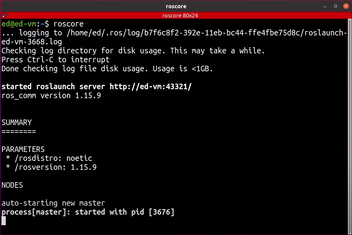
This confirms that ROS master is running perfectly in the system and that ROS Noetic has been installed successfully.