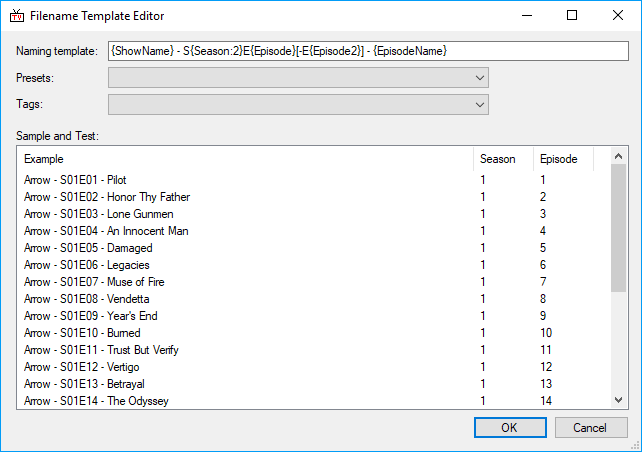
This is where the format of the filenames that TV Rename will rename to are defined.
To help illustrate the results the “Sample and Test:” panel contains the processed entries from the show and season selected in the My Shows tab.
The “Naming template:” text box displays a tokenised version of the filename which can be edited directly or populated using the “Tags:” drop-down, or overwritten with a record selected from the “Presets:” drop-down. Any changes in the “Naming Template:” are automatically reflected in the “Sample and Test:” panel.
The available tags with their definitions are listed below: -
| {ShowName} | Name of the Show |
|---|---|
| {Season} | Number of the season |
| {Season:2} | Number of the season forced to 2 characters with a leading zero |
| {Episode} | Number of the episode (within a season), eg S01E03 |
| {Episode2} | Number of the second episode of a pair (within a season), eg S01E04-E05 |
| created by the default S{Season:2}E{Episode}[-E{Episode2}]) | |
| {EpisodeName} | Name of the Episode |
| {Number} | Overall number of the episode |
| {Number:2} | Overall number of the episode forced to 2 characters with a leading zero |
| {Number:3} | Overall number of the episode forced to 3 characters with leading zero(s) |
| {SeasonNumber} | Some season numbers do not start at 1, eg they may go 2012,2013,2014. {SeasonNumber} is the nth season, so would be 1,2,3 in this example |
| {SeasonNumber:2} | As above, but forced to 2 characters with a leading zero |
| {ShortDate} | Air date in short format, eg 25/12/2017 |
| {LongDate} | Air date in lomg format, eg 25 December 2017 |
| {YMDDate} | Air date in YMD format, eg 2017/12/25 |
| {AllEpisodes} | All episodes - E01E02 etc |
| Default: | {ShowName} - S{Season:2}E{Episode}[-E{Episode2}] - {EpisodeName} |
|---|---|
| (the second preset). |