Day 3 - glimmer-dsl-tk Gem - Script Widgets the Declarative Way (Say What, Not How) - Tk - The Best-Kept Secret and Evergreen Classic Now in v8.5 with Native Look 'n' Feel on Mac, Windows, and Linux
Written by {% avatar AndyObtiva %} Andy Maleh
Software Engineering Expert from Montreal, Quebec. Creator of Glimmer and Abstract Feature Branch. Speaker at RailsConf, RubyConf, AgileConf, EclipseCon, EclipseWorld. Master in Software Engineering, DePaul University, Chicago. Blogs at Code Mastery Takes Commitment To Bold Coding Adventures. Snowboarder and Drummer.
Tcl's Tk has evolved into a practical desktop graphical user interface toolkit due to gaining truely native looking widgets on Mac, Windows, and Linux in Tk version 8.5.
Additionally, ruby 3.0 ractor (formerly known as guilds) supports truly parallel multi-threading, making both classic ruby and Tk finally viable for support in Glimmer (a language construction kit) as an alternative to Glimmer for the Standard Widget Toolkit (SWT) running on the java virtual machine (JVM).
The trade-off is that while the Standard Widget Toolkit (SWT) from Eclipse provides a plethora of high quality reusable widgets for the Enterprise (such as Nebula), Tk enables very fast app startup time and a small memory footprint via classic ruby.
Glimmer for Tk aims to provide a domain-specific language similar to the Glimmer for the Standard Widget Toolkit (SWT) to enable more productive desktop development in ruby with:
- Declarative syntax that visually maps to the widget hierarchy
- Convention over configuration via smart defaults and automation of low-level details
- Requiring the least amount of syntax possible to build graphical user interfaces (GUIs)
- Bidirectional two-way data-binding to declaratively wire and automatically synchronize widgets with business models
- Custom widget support
- Scaffolding for new custom widgets, apps, and gems
- Native-executable packaging on Mac, Windows, and Linux
You can run the girb command:
girb
This gives you irb with the glimmer-dsl-tk gem loaded
and the Glimmer module mixed into the main object for easy experimentation with scripting widgets.
The Glimmer script language provides a declarative syntax for Tk that:
- Supports smart defaults (e.g. grid layout on most widgets)
- Automates wiring of widgets (e.g. nesting a label under a toplevel root or adding a frame to a notebook)
- Hides lower-level details (e.g. main loop is started automatically when opening a window)
- Nests widgets according to their visual hierarchy
- Requires the minimum amount of syntax needed to describe an app's graphical user interface (GUI)
The Glimmer script follows these simple concepts in mapping from Tk syntax:
- Widget Keyword: Any Tk widget (e.g.
Tk::Tile::Label) or toplevel window (e.g.TkRoot) may be declared by its lower-case underscored name without the namespace (e.g.labelorroot). This is called a keyword and is represented in the Glimmer script by a method behind the scenes. - Args: Any keyword method may optionally take arguments surrounded by parentheses (e.g. a
framenested under anotebookmay receive tab options likeframe(text: 'Users'), which gets used behind the scenes by Tk code such asnotebook.add tab, text: 'Users') - Content/Options Block: Any keyword may optionally be followed by a curly-brace block containing nested widgets (content) and attributes (options). Attributes are simply Tk option keywords followed by arguments and no block (e.g.
title 'Hello, World!'under aroot)
Example of an app written in Tk imperative ("say how") syntax:
root = TkRoot.new
root.title = 'Hello, Tab!'

notebook = ::Tk::Tile::Notebook.new(root).grid

tab1 = ::Tk::Tile::Frame.new(notebook).grid
notebook.add tab1, text: 'English'
label1 = ::Tk::Tile::Label.new(tab1).grid
label1.text = 'Hello, World!'

tab2 = ::Tk::Tile::Frame.new(notebook).grid
notebook.add tab2, text: 'French'
label2 = ::Tk::Tile::Label.new(tab2).grid
label2.text = 'Bonjour, Univers!'

root.mainloop
Example of the same app written in Glimmer declarative ("say what") syntax:
root {
  title 'Hello, Tab!'

  notebook {
    frame(text: 'English') {
      label {
        text 'Hello, World!'
      }
    }

    frame(text: 'French') {
      label {
        text 'Bonjour, Univers!'
      }
    }
  }
}.openGlimmer supports bidirectional two-way data-binding via the bind keyword, which takes a model and an attribute.
Example:
This assumes a Person model with a country attribute representing their current country and a country_options attribute representing available options for the country attribute.
  combobox {
    state 'readonly'
    text bind(person, :country)
  }
That code sets the values of the combobox to the country_options property on the person model (data-binding attribute + "_options" by convention).
It also binds the text selection of the combobox to the country property on the person model.
It automatically handles all the Tk plumbing behind the scenes, such as using TkVariable and setting combobox values from person.country_options by convention (attribute_name + "_options").
More details can be found in the Hello, Combo! sample in the README..
Tk does not support a native themed listbox, so Glimmer implements its own list widget on top of Tk::Tile::Treeview. It is set to single selection via selectmode 'browse'.
Example:
This assumes a Person model with a country attribute representing their current country and a country_options attribute representing available options for the country attribute.
  list {
    selectmode 'browse'
    text bind(person, :country)
  }
That code binds the items text of the list to the country_options property on the person model (data-binding attribute + "_options" by convention).
It also binds the selection text of the list to the country property on the person model.
It automatically handles all the Tk plumbing behind the scenes.
More details can be found in the Hello, List Single Selection! in the README.
Tk does not support a native themed listbox, so Glimmer implements its own list widget on top of Tk::Tile::Treeview. It is set to multi selection by default.
Example:
This assumes a Person model with a provinces attribute representing their current country and a provinces_options attribute representing available options for the provinces attribute.
  list {
    text bind(person, :provinces)
  }
That code binds the items text of the list to the provinces_options property on the person model (data-binding attribute + "_options" by convention).
It also binds the selection text of the list to the provinces property on the person model.
It automatically handles all the Tk plumbing behind the scenes.
More details can be found in the Hello, List Multi Selection! sample in the README.
Example:
This assumes a Person model with a country attribute.
  label {
    text bind(person, :country)
  }
That code binds the textvariable value of the label to the country property on the person model.
It automatically handles all the Tk plumbing behind the scenes.
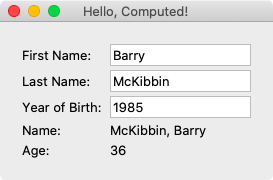
More details can be found in the Hello, Computed! sample below.
Example:
This assumes a Person model with a country attribute.
  entry {
    text bind(person, :country)
  }
That code binds the textvariable value of the entry to the country property on the person model.
It automatically handles all the Tk plumbing behind the scenes.
More details can be found in the Hello, Computed! sample below.
Buttons can set a command option to trigger when the user clicks the button. This may be done with the command keyword, passing in a block directly (no need for proc as per Tk)
Example:
  button {
    text "Reset Selection"
    command {
      person.reset_country
    }
  }
This resets the person country.
More details can be found in the Hello, Combo! sample in the README.
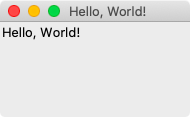
Glimmer code (from samples/hello/hello_world.rb):
include Glimmer

root {
  label {
    text 'Hello, World!'
  }
}.open
Run (with the glimmer-dsl-tk gem installed):
ruby -r glimmer-dsl-tk -e "require '../samples/hello/hello_world.rb'"
Glimmer app:
Glimmer code (from samples/hello/hello_computed.rb):
# ... more code precedes
    root {
      title 'Hello, Computed!'

      frame {
        grid column: 0, row: 0, padx: 5, pady: 5

        label {
          grid column: 0, row: 0, sticky: 'w'
          text 'First Name: '
        }
        entry {
          grid column: 1, row: 0
          width 15
          text bind(@contact, :first_name)
        }

        label {
          grid column: 0, row: 1, sticky: 'w'
          text 'Last Name: '
        }
        entry {
          grid column: 1, row: 1
          width 15
          text bind(@contact, :last_name)
        }

        label {
          grid column: 0, row: 2, sticky: 'w'
          text 'Year of Birth: '
        }
        entry {
          grid column: 1, row: 2
          width 15
          text bind(@contact, :year_of_birth)
        }

        label {
          grid column: 0, row: 3, sticky: 'w'
          text 'Name: '
        }
        label {
          grid column: 1, row: 3, sticky: 'w'
          text bind(@contact, :name, computed_by: [:first_name, :last_name])
        }

        label {
          grid column: 0, row: 4, sticky: 'w'
          text 'Age: '
        }
        label {
          grid column: 1, row: 4, sticky: 'w'
          text bind(@contact, :age, on_write: :to_i, computed_by: [:year_of_birth])
        }
      }
    }.open
# ... more code follows
Run (with the glimmer-dsl-tk gem installed):
ruby -r glimmer-dsl-tk -e "require '../samples/hello/hello_computed.rb'"
Glimmer app: