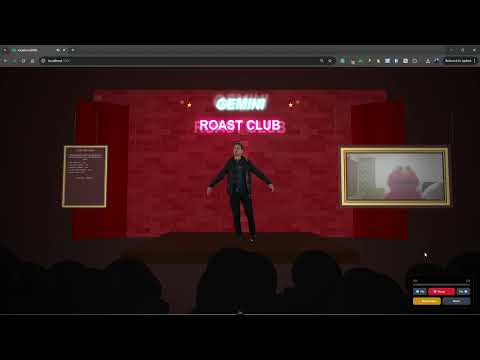
Get roasted by an AI comedian with synchronized 3D animations and realistic audio. Roast-Me is an interactive web application that captures your photo, analyzes it with Google Gemini AI, generates a witty roast, animates a 3D character delivering the roast with synchronized audio playback, and creates comedic facial expressions and body movements.


- Overview
- Demo
- Features
- Tech Stack
- Project Structure
- Prerequisites
- Installation
- Configuration
- Usage
- Development
- Deployment
- Troubleshooting
- Contributing
- License
Roast-Me combines cutting-edge AI technology with 3D animations to create a unique, hilarious user experience. The application uses:
- Google Gemini API to analyze photos and generate personalized, comedic roasts
- Google Gemini TTS for natural-sounding audio narration
- Three.js for a 3D animated character with facial expressions and body movements
- Nuxt 4 for a modern, responsive web interface
- Google Cloud Functions for serverless backend processing
The entire pipeline is seamless: capture a photo → AI analysis → roast generation → audio synthesis → synchronized 3D animation → comedic delivery.
Watch Roast-Me in action:
- 📸 Camera Capture: Real-time camera access to capture user photos directly in the browser
- 🤖 AI Roast Generation: Google Gemini API analyzes images and generates hilarious, personalized roasts
- 🔊 Text-to-Speech Audio: Gemini TTS converts roasts to natural-sounding audio with emotion
- 🎬 3D Character Animation: Three.js-powered 3D character with:
- Synchronized mouth movements to audio
- Animated facial expressions (smirks, raised eyebrows, etc.)
- Body movements and comedic gestures
- Blinking eyes for realism
- 🎵 Audio-Visual Synchronization: Perfectly timed animations that match audio playback
- 🌓 Dark/Light Mode: System preference detection with manual override
- 📱 Responsive Design: Optimized for desktop and tablet devices
- 🎯 Mock Mode: Development mode with pre-recorded roast data for testing without API calls
- ⚡ Performance Optimized: Efficient animation rendering and audio processing
- State Machine Animation: Consistent character behavior based on animation states
- Frequency-Based Audio Analysis: Real-time audio frequency analysis for dynamic mouth movements
- Procedural Body Movements: Computerized arm and body gestures matching speech patterns
- Fallback Animations: Graceful degradation if audio generation fails
- CORS-Enabled: Secure cross-origin requests with proper headers
- Nuxt 4.2.2 - Full-stack Vue framework
- Vue 3.5.26 - Progressive JavaScript framework
- Three.js 0.182.0 - 3D graphics library
- Tailwind CSS 6.14.0 - Utility-first CSS framework
- TypeScript - Type-safe JavaScript
- Color Mode Module - Dark/light mode support
- Python 3.10+ - Backend runtime
- Flask 3.1.2 - Web framework (via Cloud Functions framework)
- Google Cloud Functions - Serverless computing
- Google Generative AI SDK (
google-genai 1.58.0) - Gemini API integration - Google Cloud Firestore - Optional data storage
- Google Gemini 3 Pro Vision - Image analysis and roast generation
- Google Gemini 2.5 Flash TTS - Text-to-speech audio generation
- Google Gemini API - Core LLM capabilities
- Firebase Hosting - Frontend deployment
- Google Cloud Functions - Backend deployment
- GitHub Actions - CI/CD workflows
roast-me/
├── app.vue                          # Main Nuxt app component
├── nuxt.config.ts                   # Nuxt configuration
├── tailwind.config.js               # Tailwind CSS config
├── tsconfig.json                    # TypeScript configuration
│
├── assets/
│   └── css/
│       └── tailwind.css             # Global styles
│
├── components/
│   ├── CameraCapture.vue            # Camera input component
│   ├── ComedyClubScene.vue          # Main scene layout
│   ├── LoadingScreen.vue            # Loading indicator
│   └── ThreeScene.vue               # Three.js 3D rendering
│
├── composables/                     # Vue 3 composables (reusable logic)
│   ├── useAnimationManager.js       # Animation state management
│   ├── useAnimationAudioSync.js     # Audio/animation synchronization
│   ├── useBlinking.js               # Eye blinking animation
│   ├── useBodyRigging.js            # Body movement system
│   ├── useFacialExpressions.js      # Facial animation controller
│   ├── useJawMovement.js            # Mouth/jaw animation
│   ├── useLoadingState.js           # Loading state management
│   ├── useMockRoast.js              # Mock data loader
│   ├── useMouthAnimation.js         # Mouth movement from audio
│   ├── useProceduralAnimations.js   # Procedural gesture generation
│   ├── useThree.js                  # Three.js scene setup
│   └── animation/                   # Animation utilities
│       ├── animationConstants.js    # Animation metadata
│       ├── animationUtils.js        # Helper functions
│       └── index.js                 # Animation exports
│
├── functions/                       # Cloud Functions backend
│   ├── main.py                      # Entry point HTTP function
│   ├── config.py                    # Configuration (API keys, settings)
│   ├── requirements.txt             # Python dependencies
│   │
│   ├── services/
│   │   ├── roast_service.py         # Roast generation logic
│   │   ├── tts_service.py           # Text-to-speech service
│   │   ├── animation_service.py     # Animation script generation
│   │   ├── animation_prompt.py      # Prompt building
│   │   ├── animation_validator.py   # Animation validation
│   │   ├── animation_constants.py   # Animation metadata
│   │   └── animation_utils.py       # Animation utilities
│   │
│   └── utils/
│       ├── image_utils.py           # Image processing (resize, encode, etc.)
│       └── decode_audio.py          # Audio base64 decoding
│
├── utils/
│   ├── animationUtils.js            # Frontend animation utilities
│   ├── sceneConstants.js            # Three.js scene constants
│   └── sceneCreation.js             # Three.js scene factory
│
├── public/
│   ├── robots.txt                   # SEO robots file
│   └── mock/
│       ├── input.txt                # Mock request data
│       └── output.txt               # Mock roast response
│
├── mock/
│   └── output.txt                   # Alternative mock data location
│
├── .env                             # Environment variables (local)
├── firebase.json                    # Firebase hosting config
├── .firebaserc                      # Firebase project settings
└── .github/
    └── workflows/                   # CI/CD workflows
        ├── deploy-firebase.yml      # Frontend deployment
        └── deploy-cloud-function.yml # Backend deployment
- Node.js 18+ - Frontend build and dev server
- npm 9+ - Package manager
- Python 3.10+ - Backend runtime
- Google Cloud Account - For API keys and deployment
- Firebase Account - For hosting (optional, but recommended)
- Create a Google Cloud Project
- Enable the following APIs:
- Google Generative AI API
- Cloud Functions API
- Cloud Build API (for deployment)
- Create API credentials (API Key)
- Set up Firebase project for hosting
git clone https://github.com/Abel-Moremi/roast-me.git
cd roast-menpm installcd functions
pip install -r requirements.txt
cd ..Create a .env file in the root directory:
# Google Gemini API Key (required)
GEMINI_API_KEY=your-gemini-api-key-here

# Backend API URL (for development, use mock if not set)
ROAST_API_URL=https://your-cloud-function-url.cloudfunctions.net/roast_me

# Enable audio test mode (saves audio files locally for testing)
ENABLE_AUDIO_TEST=false
⚠️ Important: Never commit.envto version control. Add it to.gitignore.
export default defineNuxtConfig({
  compatibilityDate: '2025-07-15',
  devtools: { enabled: true },
  modules: [
    '@nuxtjs/color-mode',
    '@nuxtjs/tailwindcss'
  ],
  // Color mode settings for dark/light theme
  colorMode: {
    preference: 'system',
    fallback: 'light',
    storage: 'localStorage'
  }
})Key configuration variables:
GEMINI_API_KEY = os.environ.get("GEMINI_API_KEY")          # API Key
VISION_MODEL = "gemini-3-pro-preview"                      # Image analysis model
TTS_MODEL = "gemini-2.5-flash-preview-tts"                 # Text-to-speech model
TTS_VOICE = "Algenib"                                       # Voice character
TTS_SAMPLE_RATE = 24000                                     # Audio sample rate
ROAST_TEMPERATURE = 0.8                                     # Creativity level
ROAST_MAX_TOKENS = 2000                                     # Max response length
ENABLE_AUDIO_TEST = os.environ.get("ENABLE_AUDIO_TEST", "").lower() == "true"The application includes a mock mode for development without API calls:
- Set
ROAST_API_URLto a non-existent endpoint or use the default/mock/output.txt - Or set
ENABLE_AUDIO_TEST=trueto load mock data - The app will load pre-recorded roast data from
public/mock/output.txt
Start the development server:
npm run devAccess the application at http://localhost:3000
Development Features:
- Hot module reloading for instant updates
- Debug logging in browser console
- Mock data fallback if API fails
- Devtools enabled for debugging
Build for production:
npm run build
npm run preview
Generate static site:
npm run generate- Grant Permissions: Allow camera access when prompted
- Capture Photo: Click the camera button to take a selfie
- Wait for Processing: The app sends your photo to the AI backend
- Enjoy the Roast: Watch the 3D character deliver a hilarious roast with synchronized audio
Endpoint: POST /roast_me (Cloud Function)
Request:
{
  "image": "data:image/jpeg;base64,..."
}Response:
{
  "success": true,
  "roast": "Your roast text here...",
  "audio": "base64-encoded-audio",
  "audioMimeType": "audio/L16;codec=pcm;rate=24000",
  "animationScript": {
    "metadata": {...},
    "timeline": [...]
  }
}Edit composables/animation/animationConstants.js:
export const FACIAL_EXPRESSIONS = {
  smirk: { leftSmile: 0.6, rightSmile: 0.5, leftEyebrow: 0.4 },
  laugh: { mouth: 1.0, leftEye: 0.3, rightEye: 0.3 }
}Edit components/ThreeScene.vue to change:
- Model geometry and materials
- Lighting setup
- Camera position
- Animation parameters
Add new services in functions/services/:
# functions/services/my_service.py
def my_function(input_data):
    # Your logic here
    return output
Then import and use in functions/main.py.
Frontend:
npm run build # Check for build errorsBackend:
cd functions
python -m pytest tests/  # If tests exist
python main.py          # Local testing (requires functions-framework)
Mock Data Testing:
Open test-audio.html in a browser to test audio playback with mock data.
-
Install Firebase CLI:
npm install -g firebase-tools
-
Initialize Firebase:
firebase init hosting
-
Deploy:
npm run build
firebase deploy --only hosting
-
Set Up Google Cloud CLI:
gcloud init
gcloud auth application-default login
-
Deploy Function:
gcloud functions deploy roast_me \ --runtime python310 \ --trigger-http \ --allow-unauthenticated \ --entry-point roast_me \ --source ./functions \ --set-env-vars GEMINI_API_KEY=$GEMINI_API_KEY,ENABLE_AUDIO_TEST=false -
Get Function URL:
gcloud functions describe roast_me --format="value(httpsTrigger.url)" -
Update
.envwith the function URL
The repository includes GitHub Actions workflows for automated deployment:
.github/workflows/deploy-firebase.yml- Deploys frontend.github/workflows/deploy-cloud-function.yml- Deploys backend
Setup:
-
Add required secrets to GitHub repository settings (Settings → Secrets and variables → Actions):
GEMINI_API_KEY- Your Google Gemini API keyFIREBASE_TOKEN- Fromfirebase login:ciGCP_PROJECT_ID- Your GCP project IDGCP_SERVICE_ACCOUNT_JSON- Service account JSON keyROAST_API_URL- CRITICAL: URL of your deployed Cloud Function- Format:
https://[REGION]-[PROJECT-ID].cloudfunctions.net/roast_me - Get it from:
gcloud functions describe roast_me --format="value(httpsTrigger.url)"
- Format:
-
Push to main branch to trigger automatic deployment
⚠️ Important: IfROAST_API_URLsecret is not set, the frontend will fall back to mock data. Check GitHub Actions for warnings about missing secrets.
Verifying Deployment:
- After deployment, open DevTools (F12)
- Go to Network tab
- Capture a photo - check if requests go to real API or
/mock/output.txt - If using mock, verify
ROAST_API_URLsecret is set
Solution:
- Check browser permissions settings
- Ensure HTTPS (required for camera access, except localhost)
- Try a different browser
- Clear browser cache and reload
Solution:
- Verify
.envfile hasGEMINI_API_KEY - Check that the API key is valid in Google Cloud Console
- Ensure the API is enabled in your GCP project
Solution:
- Check browser autoplay permissions
- Verify audio MIME type:
audio/L16;codec=pcm;rate=24000 - Test in
test-audio.html - Check browser console for errors
Solution:
- Check browser WebGL support (enable in settings if disabled)
- Verify Three.js loaded correctly (check Network tab)
- Try incognito mode
- Update graphics drivers
Solution:
- Ensure value is lowercase in config check:
.lower() == "true" - Set in
.envasENABLE_AUDIO_TEST=True(any case) - Restart development server after changing
Solution:
- Check audio sample rate matches (should be 24000 Hz)
- Verify animation timeline duration matches audio duration
- Check browser DevTools Timing for frame drops
- Reduce animation complexity in
useProceduralAnimations.js
Solution:
- In GitHub, settings → Secrets and variables → Actions
- Verify
ROAST_API_URLsecret is set to your Cloud Function URL - Format should be:
https://[REGION]-[PROJECT-ID].cloudfunctions.net/roast_me - After adding secret, push code or use workflow_dispatch to redeploy
- GitHub Actions will warn if secret is missing (check Actions tab)
Solution:
- This means the API URL environment variable is not configured
- Check DevTools (F12) → Console for debug logs
- Verify you have set the
ROAST_API_URLGitHub secret (not just in.env) .envworks locally but GitHub Actions secrets are needed for production- Redeploy after adding the secret:
git pushor use Actions tab to run workflow manually
Enable detailed logging:
-
Frontend: Open browser DevTools (F12)
- Look for
🎥 CameraCapture,📦 useMockRoast, and🎬 ThreeScenelogs
- Look for
-
Backend: Check Cloud Function logs
gcloud functions logs read roast_me --limit 50 -
Local Backend Testing:
cd functions
python -c "from main import roast_me; roast_me(request)"
Contributions are welcome! Please follow these guidelines:
- Fork the repository
- Create a feature branch (
git checkout -b feature/amazing-feature) - Commit changes (
git commit -m 'Add amazing feature') - Push to branch (
git push origin feature/amazing-feature) - Open a Pull Request
- JavaScript: Use ES6+ syntax, follow existing patterns
- Python: Follow PEP 8, use type hints
- Vue: Use Composition API with
<script setup> - CSS: Use Tailwind utility classes
This project is licensed under the MIT License - see the LICENSE file for details.
- Google Gemini API for AI capabilities
- Three.js community for 3D graphics
- Nuxt and Vue communities
- Firebase for hosting and backend services
For issues, questions, or suggestions:
- Open a GitHub Issue
- Check Discussions
Made with ❤️ by Abel Moremi