Auth Email Verification

Firebase doc | Stackowerflow discussion
Instead of using the fact of existing user in firebase for access protected routes in my app, I'll use state.isLoggedIn: auth.currentUser.emailVerified.
To fire email verification I created emailVerification function and called it in register and login auth-operations:
auth-operation.js:
import { db, auth, avatarStorage, storage } from '../../firebase/config';
import { openMailClient } from '../../helpers/openMailClient';

const emailVerification = async () => {
  try {
    await sendEmailVerification(
      auth.currentUser
      // Next object would use in a case of implementing App Links (android) and Universal Links (ios) features for returning to the app by deep link from another app
      // , {
      // handleCodeInApp: true,
      // url: 'https://scenery-53dd5.firebaseapp.com',
      // }
    );
    Alert.alert(
      'Email verification',
      'Please confirm your email and login with your credentials',
      [
        {
          text: 'Open Email Client',
          onPress: openMailClient,
        },
        {
          text: 'Dismiss',
          onPress: () => {},
        },
      ]
    );
  } catch (error) {
    console.error(
      'Email verification error: code, message',
      error.code,
      error.message
    );
    throw error;
  }
};

export const register = createAsyncThunk(
  'auth/register',
  async ({ avatar, name, email, password }, thunkAPI) => {
    try {
      const { user } = await createUserWithEmailAndPassword(
        auth,
        email,
        password
      );

      const { photoUrl, uniquePhotoId } = avatar
        ? await fireStorage.uploadImage({
            storage: avatarStorage,
            image: avatar,
            userId: user.uid,
          })
        : { photoUrl: '', uniquePhotoId: '' };

      await updateProfile(user, { displayName: name, photoURL: photoUrl });

      if (user.emailVerified === false) {
        await emailVerification();
        // await signOut(auth);
      }

      return {
        avatar: user.photoURL,
        name: user.displayName,
        id: user.uid,
        email: user.email,
        emailVerified: user.emailVerified,
      };
    } catch (error) {
      return thunkAPI.rejectWithValue(error.message);
    }
  }
);

export const logIn = createAsyncThunk(
  'auth/login',
  async ({ email, password }, thunkAPI) => {
    try {
      const { user } = await signInWithEmailAndPassword(auth, email, password);
      if (user.emailVerified === false) {
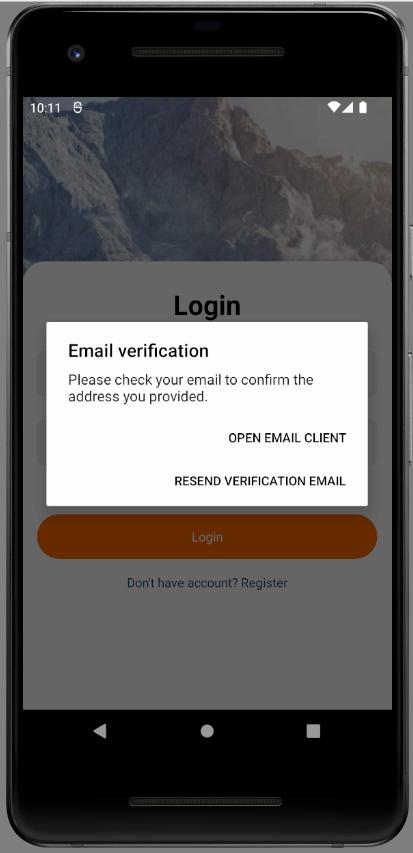
        Alert.alert(
          'Email verification',
          'Please check your email to confirm the address you provided. ',
          [
            {
              text: 'Resend verification email',
              onPress: () => {
                emailVerification();
              },
            },
            {
              text: 'Open Email Client',
              onPress: openMailClient,
            },
          ]
        );
      }
      return {
        avatar: user.photoURL,
        name: user.displayName,
        id: user.uid,
        email: user.email,
        emailVerified: user.emailVerified,
      };
    } catch (error) {
      return thunkAPI.rejectWithValue(error.message);
    }
  }
);Stackowerflow discussion | Stackowerflow discussion 2 | Article
To open email client from Scenery app I wrote openMailClient function:
openMailClient.js
import * as IntentLauncher from 'expo-intent-launcher';
import { Linking, Platform } from 'react-native';

export const openMailClient = () => {
  if (Platform.OS === 'ios') {
    Linking.canOpenURL('message:0')
      .then((supported) => {
        if (!supported) {
          console.log('Cant handle url');
        } else {
          return Linking.openURL('message:0').catch(
            this.handleOpenMailClientErrors
          );
        }
      })
      .catch(this.handleOpenMailClientErrors);
  } else {
    const activityAction = 'android.intent.action.MAIN'; // Intent.ACTION_MAIN
    const intentParams = {
      flags: 268435456, // Intent.FLAG_ACTIVITY_NEW_TASK
      category: 'android.intent.category.APP_EMAIL', // Intent.CATEGORY_APP_EMAIL
    };

    IntentLauncher.startActivityAsync(activityAction, intentParams).catch(
      this.handleOpenMailClientErrors
    );
  }
};Firebase help | Stackowerflow discussion | Custom email action handler |
You can slightly impact firebase auth email view:

project settings / name

authentication template

verification email
You can instead create and host a custom email action handler to do custom processing and to integrate the email action handler with your website. Custom email action handler
As describes here, there are two option to update auth.currentUser.emailVerified state:
- Logout user after sending verification email and bring user to the login when verification link would be pressed
- Reload user when verification link has been pressed and scenery app get focus again.
I chose the second option. I wrote useAppState hook to get isAppStateVisible in Main.js component:
useAppState.js
import React, { useState, useEffect } from 'react';
import { AppState } from 'react-native';

export const useAppState = () => {
  const [appStateVisible, setAppStateVisible] = useState(appState.current);

  useEffect(() => {
    const subscription = AppState.addEventListener('change', (nextAppState) => {
      setAppStateVisible(nextAppState);
    });

    return () => {
      subscription.remove();
    };
  }, []);

  return appStateVisible === 'active';
};
isLoggedIn is a auth state field determines is user has access to a private routes. It depends of auth.currentUser.emailVerified. In Main.js by useEffect I catch conditions when user should be reloaded (user clicks link in verification email and returns to the scenery app). When user becomes logged in (auth.currentUser.emailVerified === true) useEffect doesn't call its callback and user doesn't reloaded.
Main.js
import { db, auth } from './firebase/config';
import { updateUserProfile } from './redux/auth/auth-slice';
import {
  selectIsLoggedIn,
  selectIsLoading as selectIsUserLoading,
} from './redux/auth/auth-selector';
import { useAppState } from './hooks';

export default function Main() {
  const dispatch = useDispatch();
  const isLoggedIn = useSelector(selectIsLoggedIn);
  const isAppStateVisible = useAppState();

  useEffect(() => {
    if (!isLoggedIn && auth.currentUser && isAppStateVisible) {
      auth.currentUser.reload().then(() => {
        dispatch(
          updateUserProfile({
            avatar: auth.currentUser.photoURL,
            name: auth.currentUser.displayName,
            id: auth.currentUser.uid,
            email: auth.currentUser.email,
            isLoggedIn: auth.currentUser.emailVerified,
          })
        );
      });
    }
  }, [isLoggedIn, isAppStateVisible, auth.currentUser]);
  ...
}ActionCodeSettings interface | Passing State in Email Actions | Setting up Apple Universal Links
When a user clicks on a link in Firebase auth verification email, he is brought to a web notification that is opened in browser. It is possible to create a link in this web notification, that will bring the user back to scenery app.
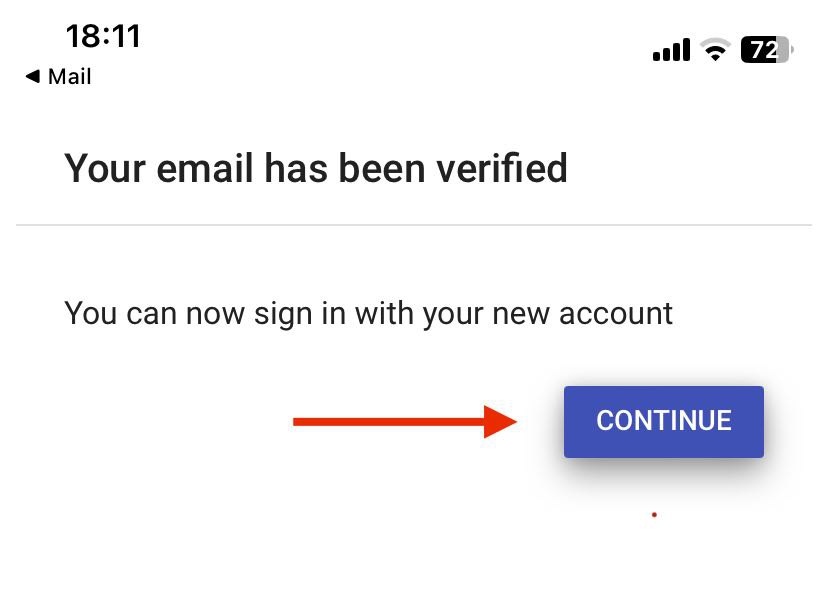
To implement such functionality you should pass actionCodeSettings object to sendEmailVerification:
const actionCodeSettings = {
  url: 'https://www.example.com/?email=' + firebase.auth().currentUser.email,
  iOS: {
    bundleId: 'com.example.ios',
  },
  android: {
    packageName: 'com.example.android',
    installApp: true,
    minimumVersion: '12',
  },
  handleCodeInApp: true,
  // When multiple custom dynamic link domains are defined, specify which
  // one to use.
  dynamicLinkDomain: 'example.page.link',
};

sendEmailVerification(auth.currentUser, actionCodeSettings);
Unfortunately firebase dynamic link is deprecated so you should use others technics.
I haven't implemented this functionality in scenery yet.