PixelAudio is a Processing Library that maps arrays of audio samples onto arrays of pixel values, captures and transforms drawing gestures, and creates interactive audio and image events for live performance. You can turn a 2D image into an audio signal or turn a 1D signal (including live or recorded audio) into a 2D image. You can draw a curve and record its timing information and then replay it with animation and an audio sampler or granular synthesis engine. You can create presets for drawing and audio synthesis and cue them in live performance. PixelAudio began as a color organ, where sine waves mapped to a Hilbert curve determined the pixel values (RGB colors) in a bitmap traversed by the curve. It later added sampling and granular synthesis instruments that can be played by drawing lines. There are several demos here: https://vimeo.com/showcase/12305064, and an early performance/installation work, Campos | Temporales, here: https://vimeo.com/767814419.
To start with, you'll need to have Processing installed and configured. If this is all new to you, go to the Download webpage for Processing and install it. Then check out the Environment documentation with particular attention to setting the location of your Sketchbook folder. The path to the Sketchbook folder is typically something like "/Users/your_home_directory/Documents/Processing/". Once you have the path configured, navigate to the Sketchbook folder. It contains a number of folders, including one called "libraries."
To install PixelAudio, go to the Releases page and download the latest version of PixelAudio. Extract the files from the downloaded archive. You should end up with one folder, "PixelAudio". Move it into the "libraries" folder in your Sketchbook folder. That's all you need to do to install the PixelAudio library, or any other Processing library.
Some PixelAudio classes use the Minim audio library. PixelAudio has no other dependencies, but to run the examples that come with it you will need to install some additional libraries. You can install them with the Processing Sketch->Import Library...->Manage Libraries... menu command, which opens the Contribution Manager dialog. In addition to Minim, other libraries used in the examples are Video Export, by Abe Pazos, oscP5, by Andreas Schlegel, and the G4P library, by Peter Lager. I also recommend you install the Sound library and Video Library for Processing 4, both from the Processing Foundation.
I use the Minim Audio Library for working with audio signals and audio files. I rely on Video Export to save animations to a video file. Video Export depends on ffmpeg. If you don't have ffmpeg installed, see the Video Export page or the official ffmpeg site for more information. MacOS Silicon binaries can be found here. Instructions for installation on MacOS with Homebrew, MacPorts, or manually can be found here. I use G4P wherever I have a GUI: TutorialOne_05_GesturePlayground, WaveSynthEditor, ArgosyMixer, Bagatelle. I use oscP5 in the Bagatelle and TutorialOne_04_Network examples to communicate over a network with the UDP protocol. My UDP clients are created with Max.
In PixelAudio classes, 1D signals and 2D bitmaps are related to each other through lookup tables (LUTs) that map locations in the signal and bitmap arrays onto one another. You could think of the signal tracing a path (the signal path) over the bitmap, visiting every pixel. The signal path may be continuous, stepping from pixel to connected pixel, in which case it is a Hamiltonian Path over a 4-connected or 8-connected grid, the bitmap. It may even be a loop, where the last pixel connects to the first, but it may also skip around, as long as it visits every pixel exactly once. The signalToImageLUTin PixelAudioMapper lists the position index in the bitmap of each pixel the signal visits. Similarly, the imageToSignalLUT tells you what position in the signal corresponds to a particular pixel. This makes it easy to click on the bitmap and play an audio sample corresponding exactly to the location you clicked, or to transcode an audio signal into RGB pixel values and display them in a bitmap.
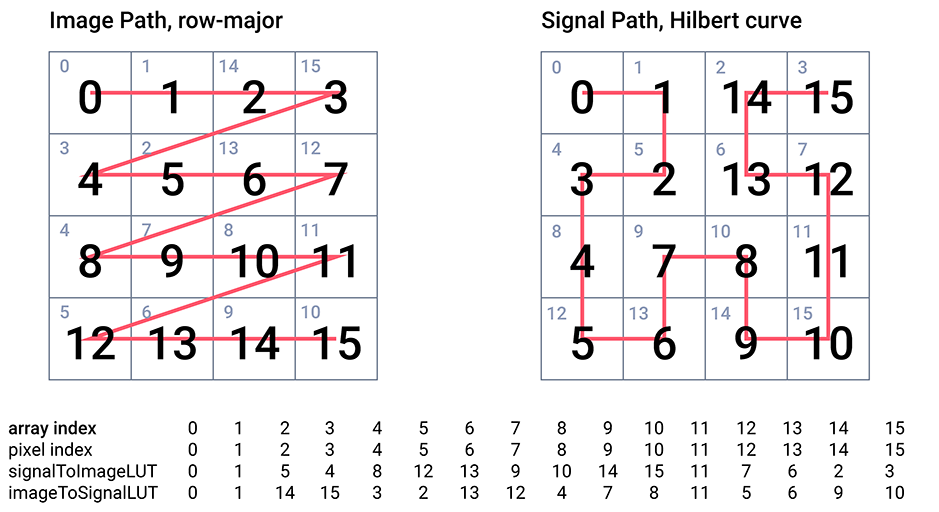
The PixelAudioMapper class and the PixelMapGen class and its subclasses provide the core functionality of the library and are abundantly commented. PixelMapGen provides a lightweight framework for creating mappings between audio sample and pixel data arrays. A PixelMapGen subclass ("gen" for short) generates the (x,y) coordinates of the signal path over the image, and creates the LUTs from the coordinates. PixelMapGen subclasses plug in to PixelAudioMapper, which can transcode pixel and audio data and write it to pixel or audio sample arrays while remaining independent of the actual audio and image formats. The one restriction (at the moment) is that color is encoded in RGB or RGBA format and audio is encoded as 16-bit floating point values over the interval (-1.0, 1.0). Audio values can exceed these limits in calculations, but should be normalized to the interval for playing audio or saving to file. PixelAudioMapper includes a trove of methods for color space operations, array shifting, LUT mapping, and transcoding. While it should be relatively easy to write your own PixelMapGen child class (you only need a list of coordinates for the signal map), there are many built-in child classes that can get you up and running.
Other core classes include the WaveSynth class, which uses WaveData objects for additive audio synthesis to create both a playable audio signal and an animated image that are generated in parallel. Some of the coding examples show how you can read and write JSON files of WaveSynth configurations. The Argosy and Lindenmayer classes provide pattern-generation tools that can be used to create visual or audible rhythms, textures, and signals. An OpenSimplex implementation, ScaledSimplex, provides scaled random noise.
The library includes packages for:
- Curve-modeling
- Gesture capture and transformation
- Sampler-based audio synthesis
- Granular synthesis
- Event scheduling
- File IO for curve and gesture data and audio synthesis settings
Example sketches in Processing and Java provide a survey of PixelAudio features, particularly for:
- mapping audio signals and bitmaps
- drawing curves and capturing gestures
- mixing color channels and audio samples
- playing audio samples interactively
- capturing live audio
- adjusting audio synthesis settings
- using JSON files for additive synthesis, gesture-modeling and audio synthesis settings
- communication with external applications via UDP
Some sketches include graphical user interfaces and can be used directly in live performance. See the Examples README for descriptions of each example.
Composer Christopher Walczak and I used the WaveSynth, Argosy and Lindenmayer classes to produce the music and animation for Campos | Temporales (2023). The first beta release of the PixelAudio library happened November 9, 2024, at Experimental Sound Studio in Chicago, where I was the Spain-Chicago artist in residence. New workshop and beta releases arrived in January and May, 2025. In early July 2025, I presented PixelAudio at the EVA London Conference. Release 0.9.1-beta was presented for the EVA London workshop.
Release 0.9.5-beta, November 12, 2025: A new package of classes to support digital audio sampling synthesis was a major addition to PixelAudio and replaced previous audio generation classes, which were mostly created within Processing.
Release 0.9.6-beta was created for a workshop in Chicago. It provided gesture capture and playback classes plus thoroughly revised Sampler and Granular Synthesis polyphonic audio instruments, and a speedier WaveSynth. It also included a complete tutorial sequence.
Release 0.9.8.0-beta: nearly ready for publication, ready for user-testing. Obsolete and @Deprecated classes were dropped. Tutorials have new material, included a real-time performance app, Bagatelle. Javadocs are substantial and worth reading for an overview of PixelAudio and PixelAudio packages.
Release 0.9.8.5-beta fixed an elusive bug in the Granular synth. It also provided the Bagatelle example sketch with a more robust preset structure and improved WaveSynthEditor.
Release 0.9.9.0-beta, July 12, 2026: includes a light-weight test suite. A new example sketch, SampleAccurateDemo, presents methods for sample-accurate audio scheduling. I've also implemented wrap-around audio buffers for both synths and updated example sketches to toggle wrap-around on and off.
See Issue #42 for my checklist of tasks to complete before publication. Some ideas for the next release beyond 1.0 are listed in issue #43.