This project manages student fee payments and provides comprehensive tools for tracking and reporting.
➕ Add Payment Record
✏️ Update Payment Record
🗑️ Delete Payment Record
📄 View Payment History
📌 Unpaid Fees List
⏰ Overdue Payments Report
📆 Total Fee Collection by Period
✔️ Efficient fee tracking
✔️ Improved administrative control
✔️ Easy access to student payment history
✔️ Periodic financial reporting
Before running this application, ensure the following are installed:
☕ Java Development Kit (JDK) – Version 8 or higher
🌐 Apache Tomcat – Version 9.0 or higher
🐬 MySQL Server 5.7 or 🧰 XAMPP Server
🔌 MySQL JDBC Driver – mysql-connector-java
💻 IDE Options:🧠 Eclipse (J2EE), 🚀 IntelliJ IDEA, or 🛠️ Any Java-compatible IDE
🌎 Web Browser:🌐 Chrome, 🦊 Firefox, or 🧭 Edge
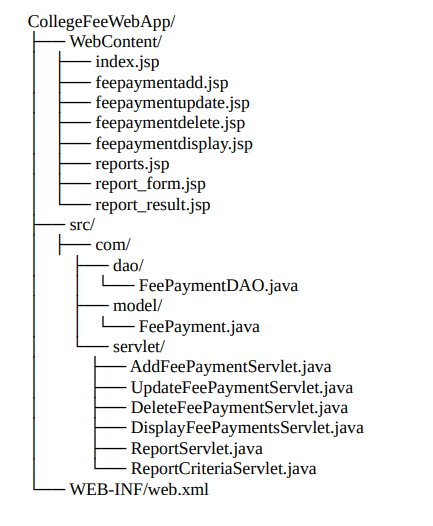
Download all the project files and organize them according to the project structure above.
- Start your MySQL server
- Run the database setup scripts provided above
- Update database credentials in
FeePaymentDAO.java:connection = DriverManager.getConnection( "jdbc:mysql://localhost:3306/your_databaseaname", "your_username", "your_password");
- Download MySQL Connector/J from the official MySQL website
- Add the JAR file to your project's
WEB-INF/libdirectory - If using an IDE, add it to your build path
- Create a new Dynamic Web Project in your IDE
- Copy all source files to the appropriate folders
- Deploy the project to Tomcat server
- Start the Tomcat server
Open your web browser and navigate to:
http://localhost:8080/CollegeFeeWebApp/index.jsp


This project demonstrates:
- MVC Architecture: Clear separation between Model, View, and Controller
- Database Integration: CRUD operations with MySQL
- Web Development: JSP, Servlets, HTML, CSS, JavaScript
- Input Validation: Both client-side and server-side
- Report Generation: Dynamic data analysis and presentation
- Professional UI: Responsive design with Bootstrap