


Git plugin for Neovim (based on libgit2).
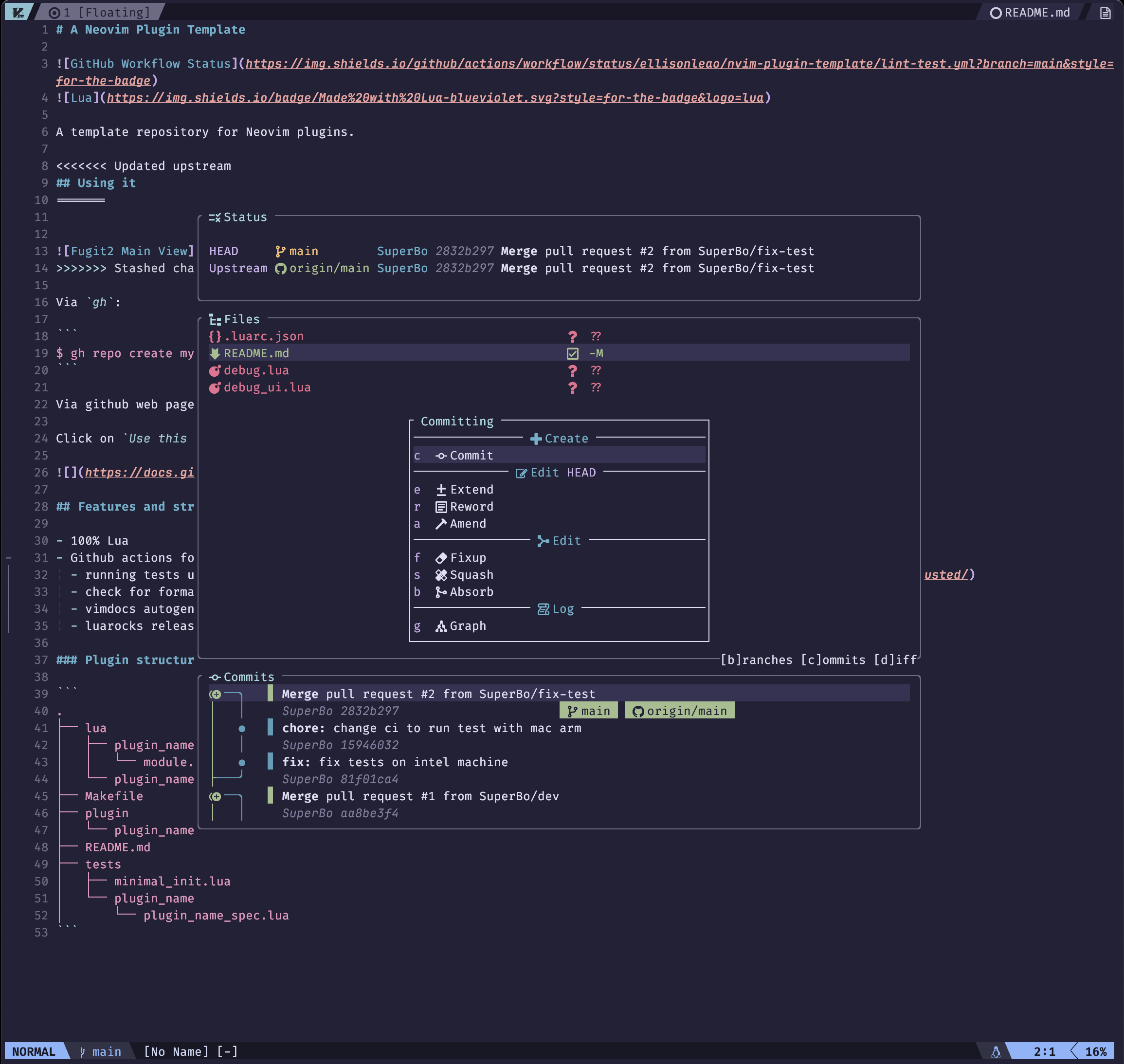
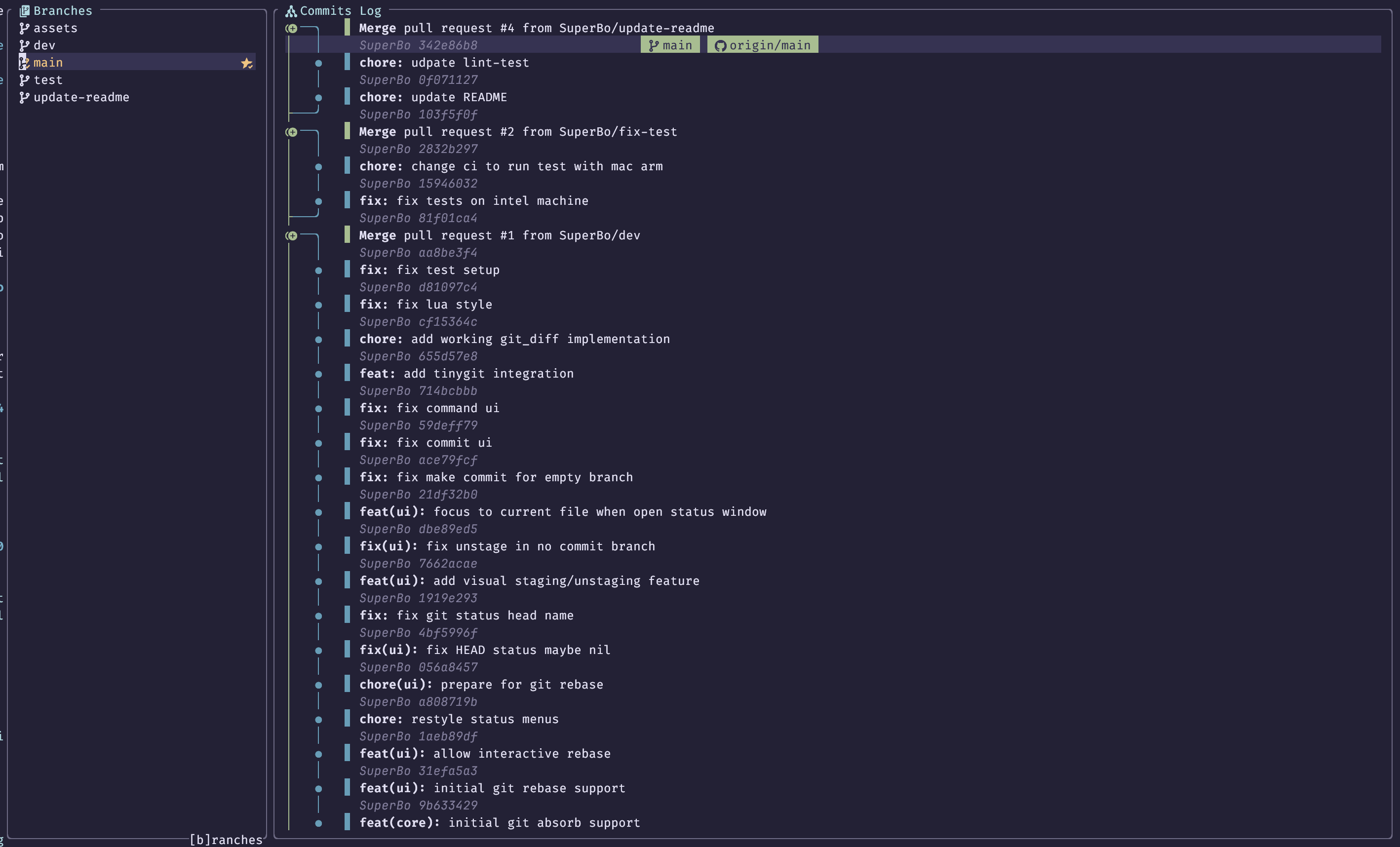
- ✔ Floating git source window.
- ✔ Magit style menu.
- ✔ Patch View.
- ✔ Stage/Unstage hunkes in patch view.
- ✔ Nice git graph.
- ✔ Native branch picker.
- ✔ Diff view.
- ✔ Git blame.
- ✔ Interactive in-memory rebase.
- ✔ Stash management.
- ☐ TODO: Allow remap default key binding.
- ☐ TODO: Proper help menu.
Please install libgit2 before installing plugin.
Install GPGme if you use gpg key for commit signing.
Third party libraries:

:Rocks install fugit2.nvim
The setup function must be called before using this plugin, see Installation Guide.
If you are using lazy, you can use this config
{
  'SuperBo/fugit2.nvim',
  build = false,
  opts = {
    width = 100,
  },
  dependencies = {
    'MunifTanjim/nui.nvim',
    'nvim-tree/nvim-web-devicons',
    'nvim-lua/plenary.nvim',
    {
      'chrisgrieser/nvim-tinygit', -- optional: for Github PR view
      dependencies = { 'stevearc/dressing.nvim' }
    },
  },
  cmd = { 'Fugit2', 'Fugit2Diff', 'Fugit2Graph', 'Fugit2Rebase' },
  keys = {
    { '<leader>F', mode = 'n', '<cmd>Fugit2<cr>' }
  }
},
In case you want to use more stable diffview.nvim for diff split view.
Details
{
  'SuperBo/fugit2.nvim',
  opts = {
    width = 70,
    external_diffview = true, -- tell fugit2 to use diffview.nvim instead of builtin implementation.
  },
  dependencies = {
    'MunifTanjim/nui.nvim',
    'nvim-tree/nvim-web-devicons',
    'nvim-lua/plenary.nvim',
    {
      'chrisgrieser/nvim-tinygit', -- optional: for Github PR view
      dependencies = { 'stevearc/dressing.nvim' }
    },
  },
  cmd = {
    'Fugit2', 'Fugit2Blame', 'Fugit2Diff', 'Fugit2Graph', 'Fugit2Rebase',
    'Gwrite',
  },
  keys = {
    { '<leader>F', mode = 'n', '<cmd>Fugit2<cr>' }
  }
},
{
  'sindrets/diffview.nvim',
  dependencies = { 'nvim-tree/nvim-web-devicons' },
  -- lazy, only load diffview by these commands
  cmd = {
    'DiffviewFileHistory', 'DiffviewOpen', 'DiffviewToggleFiles', 'DiffviewFocusFiles', 'DiffviewRefresh'
  }
}TODO: add later
---@class Fugit2Config
---@field width integer|string Main popup width
---@field max_width integer|string Main popup popup width when expand patch view
---@field min_width integer File view width when expand patch view
---@field content_width File view content width
---@field height integer|string Main popup height
---@field show_patch boolean show patch for active file when open fugit2 main window
---@field libgit2_path string? path to libgit2 lib, default: "libgit2"
---@field gpgme_path string? path to gpgme lib, default: "gpgme"
---@field external_diffview boolean whether to use external diffview.nvim or Fugit2 implementation
---@field blame_priority integer priority of blame virtual text
---@field blame_info_width integer width of blame hunk detail popup
---@field blame_info_height integer height of blame hunk detail popup
---@field command_timeout integer timeout in milisecond of command like git pull / git push
---@field colorscheme string? custom color scheme override
local opts = {
  width = 100,
  min_width = 50,
  content_width = 60,
  max_width = "80%",
  height = "60%",
  external_diffview = false,
  blame_priority = 1,
  blame_info_height = 10,
  blame_info_width = 60,
  show_patch = false,
  command_timeout = 15000,
}- Catppuccin
- Nightfox
- Tokyo Night
- Kanagawa
- Cyberdream: please set
colorscheme = "cyberdream"in plugin options.
Please refer to Usage Guide.
Open the rebase view from the status window (Fugit2) by pressing r, or directly with:
:Fugit2Rebase                  " rebase current branch onto its upstream
:Fugit2Rebase . origin/main    " rebase current branch onto origin/main
Status window — Rebasing menu (r)
| Key | Action |
|---|---|
i |
Rebase current branch onto upstream interactively |
e |
Rebase onto another branch (branch picker) |
Rebase view keybindings
| Key | Action |
|---|---|
p |
Pick |
r / w |
Reword commit message |
s |
Squash into parent |
f |
Fixup into parent (discard message) |
d / x |
Drop |
b |
Break (drop all following commits) |
gj / Ctrl-j |
Move commit down |
gk / Ctrl-k |
Move commit up |
<Enter> |
Execute rebase |
q / <Esc> |
Abort / close |
Note:
grefreshes the status window (previouslyr).
Open the stash menu from the status window (Fugit2) by pressing z.
Status window — Stash menu (z)
| Key | Action |
|---|---|
z |
Save current changes to a new stash (prompts for optional message) |
p |
Pop top stash (apply + remove) |
a |
Apply top stash (keep stash) |
d |
Drop top stash (with confirmation) |
l |
Open browsable stash list |
Stash menu arguments (toggles)
| Key | Argument |
|---|---|
-u |
Include untracked files |
-k |
Keep index (staged changes stay staged) |
Stash list keybindings
| Key | Action |
|---|---|
a |
Apply stash at cursor |
p |
Pop stash at cursor |
d |
Drop stash at cursor (with confirmation) |
q/<Esc> |
Close stash list |
Upstream issues:
- Performance with large repo libgit2/libgit2#4230.
Very special thanks to these plugins and their authors.
- nvim-tiny for Github integration.
- diffview.nvim for Diffview integration.
- nui.nvim for his great Nvim UI library.
- plenary.nvim for utilities and testing framework.
- libgit2 for lightweight and performance git library.
- lazygit for Git pane inspirations.
- fugitive.vim for a great vim git client.
- magit for a great Git client.
- neogit for great Neovim git client.
- vim-flog for beautiful git graph.
- blame.nvim for git blame inspiration.