The different tools and sub-tools used by PR-Agent are adjustable via a Git configuration file. There are four main ways to set persistent configurations:
- Wiki configuration page
- Local configuration file
- Global configuration file
- External configuration URL (CLI flag)
In terms of precedence, wiki configurations will override local configurations, local configurations will override global configurations, and global configurations will override an external configuration URL.
For a list of all possible configurations, see the configuration options page.
In addition to general configuration options, each tool has its own configurations. For example, the review tool will use parameters from the pr_reviewer section in the configuration file.
!!! tip "Tip1: Edit only what you need"
Your configuration file should be minimal, and edit only the relevant values. Don't copy the entire configuration options, since it can lead to legacy problems when something changes.
!!! tip "Tip2: Show relevant configurations"
If you set config.output_relevant_configurations to True, each tool will also output in a collapsible section its relevant configurations. This can be useful for debugging, or getting to know the configurations better.
Platforms supported: GitHub, GitLab, Bitbucket
With PR-Agent, you can set configurations by creating a page called .pr_agent.toml in the wiki of the repo.
The advantage of this method is that it allows to set configurations without needing to commit new content to the repo - just edit the wiki page and save.
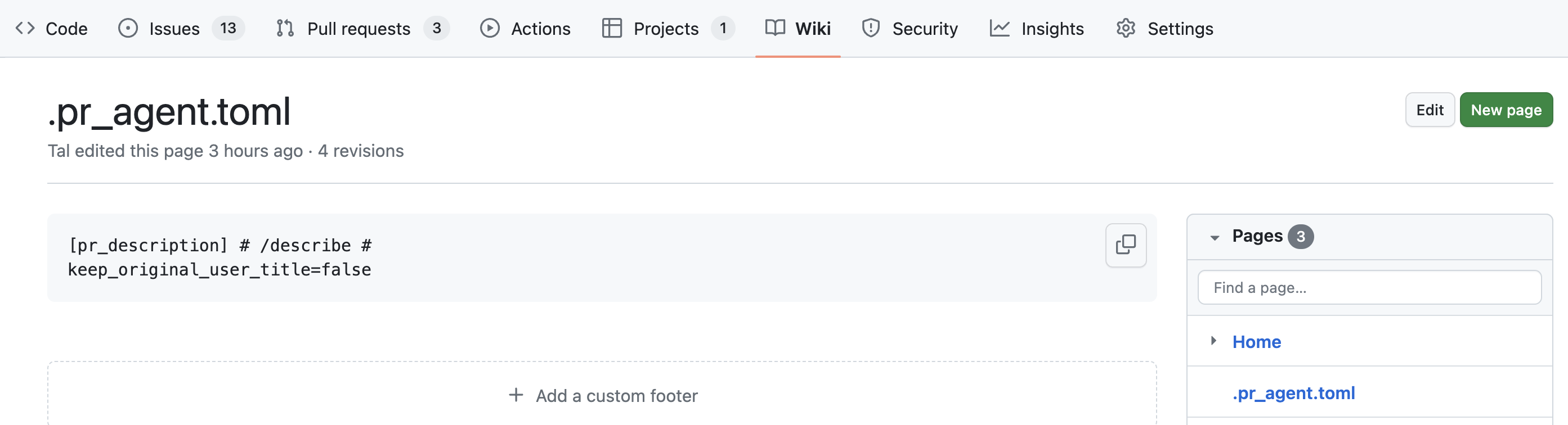
Click here to see a short instructional video. We recommend surrounding the configuration content with triple-quotes (or ```toml), to allow better presentation when displayed in the wiki as markdown. An example content:
[pr_description]
generate_ai_title=true
PR-Agent will know to remove the surrounding quotes when reading the configuration content.
Platforms supported: GitHub, GitLab, Bitbucket, Azure DevOps
By uploading a local .pr_agent.toml file to the root of the repo's default branch, you can edit and customize any configuration parameter. Note that you need to upload or update .pr_agent.toml before using the PR Agent tools (either at PR creation or via manual trigger) for the configuration to take effect.
For example, if you set in .pr_agent.toml:
[pr_reviewer]
extra_instructions="""\
- instruction a
- instruction b
...
"""
Then you can give a list of extra instructions to the review tool.
Platforms supported: GitHub, GitLab (cloud), Bitbucket (cloud)
If you create a repo called pr-agent-settings in your organization, its configuration file .pr_agent.toml will be used as a global configuration file for any other repo that belongs to the same organization.
Parameters from a local .pr_agent.toml file, in a specific repo, will override the global configuration parameters.
For example, in the GitHub organization qodo-ai:
-
The file
https://github.com/the-pr-agent/pr-agent-settings/.pr_agent.tomlserves as a global configuration file for all the repos in the GitHub organizationqodo-ai. -
The repo
https://github.com/the-pr-agent/pr-agentinherits the global configuration file frompr-agent-settings.
Platforms supported: GitLab, Bitbucket Data Center
Create a repository named pr-agent-settings within a specific project (Bitbucket) or a group/subgroup (Gitlab).
The configuration file in this repository will apply to all repositories directly under the same project/group/subgroup.
!!! note "Note" For Gitlab, in case of a repository nested in several sub groups, the lookup for a pr-agent-settings repo will be only on one level above such repository.
Relevant platforms: Bitbucket Data Center
Create a dedicated project to hold a global configuration file that affects all repositories across all projects in your organization.
Setting up organization-level global configuration:
- Create a new project with both the name and key: PR_AGENT_SETTINGS.
- Inside the PR_AGENT_SETTINGS project, create a repository named pr-agent-settings.
- In this repository, add a
.pr_agent.tomlconfiguration file—structured similarly to the global configuration file described above. - Optionally, you can add organizational-level global best practices.
Repositories across your entire Bitbucket organization will inherit the configuration from this file.
!!! note "Note" If both organization-level and project-level global settings are defined, the project-level settings will take precedence over the organization-level configuration. Additionally, parameters from a repository’s local .pr_agent.toml file will always override both global settings.
Platforms supported: GitHub, GitLab, Bitbucket, Azure DevOps
When running PR-Agent from the CLI (or any wrapper that exposes its arguments), you can merge an additional .pr_agent.toml from any URL or local path before the repo-local and global configurations are applied. This is useful when:
- You want a single shared configuration that applies to repositories nested deep inside subgroups, where the project/group-level lookup only walks one level up.
- The shared configuration is published outside of a Git host (a static site, an internal artifact server, an S3 bucket, etc.).
- You want CI-time control over which defaults are layered in, without committing a file to the target repository.
Pass --extra_config_url to the CLI, or set the PR_AGENT_EXTRA_CONFIG_URL environment variable:
python -m pr_agent.cli \
  --pr_url=<MR/PR URL> \
  --extra_config_url=https://config.example.com/pr-agent/shared.toml \
  review
Accepted values:
https://…orhttp://…— fetched at runtimefile:///path/to/shared.toml— read from the local filesystem- A bare filesystem path — same as
file://
For private endpoints (e.g. a GitLab API URL pointing at a private pr-agent-settings file), provide a single header via the PR_AGENT_EXTRA_CONFIG_AUTH_HEADER environment variable, formatted as <HeaderName>: <value>:
# GitLab Personal Access Token
export PR_AGENT_EXTRA_CONFIG_AUTH_HEADER="PRIVATE-TOKEN: <your-personal-access-token>"

# GitLab CI job token
export PR_AGENT_EXTRA_CONFIG_AUTH_HEADER="JOB-TOKEN: $CI_JOB_TOKEN"

# Generic bearer token
export PR_AGENT_EXTRA_CONFIG_AUTH_HEADER="Authorization: Bearer <your-token>"External-URL settings are applied first, so every other layer overrides them:
built-in defaults
  < --extra_config_url
    < global pr-agent-settings
      < local .pr_agent.toml (repo default branch)
        < wiki .pr_agent.toml
          < environment variables (PR_AGENT__SECTION__KEY)
This means an external URL acts as an organization-wide default that any team can still override with their own pr-agent-settings or repo-local .pr_agent.toml.
The external file is loaded through the same secure loader as the repo-local .pr_agent.toml: includes, preloads, custom loaders, and other directives that could execute code or read arbitrary files are rejected. The fetcher additionally:
- Limits the response size to 1 MB
- Uses a 10-second request timeout
- Only accepts
http,https,fileschemes (or a bare local path)
If the fetch fails, the request is logged and PR-Agent continues with the remaining configuration layers.