The best AI speech recognition, translation, and multilingual dubbing solution 🚀



Voice-Pro is a state-of-the-art web app that transforms multimedia content creation. It integrates YouTube video downloading, voice separation, speech recognition, translation, and text-to-speech into a single, powerful tool for creators, researchers, and multilingual professionals.
- 🔊 Top-tier speech recognition: Whisper, Faster-Whisper, Whisper-Timestamped
- 🎤 Zero-shot voice cloning: F5-TTS, E2-TTS, CosyVoice (incl. Fun-CosyVoice3 — Korean and 8 more languages)
- 📢 Multilingual text-to-speech: Edge-TTS, kokoro (optional Azure TTS with your own keys — see Azure services)
- 🎥 YouTube processing & audio extraction: yt-dlp
- 🌍 Instant translation for 100+ languages: Deep-Translator (optional Azure Translator with your own keys)
A robust alternative to ElevenLabs, Voice-Pro empowers podcasters, developers, and creators with advanced voice solutions.
- Due to WeConnect development work, Voice-Pro development and updates are not possible for the time being.
- We have made all Voice-Pro code open source and completely free. Voice-Pro can now be freely distributed and modified by anyone.
- It works well on Windows with NVIDIA GPU. Operation on Mac and Linux has not been verified.
- Please leave your requests on the
or
pages.
- Troubleshooting: In most cases, issues can be resolved by deleting the
installer_filesfolder and then runningstart.batagain (a clean reinstall takes only a few minutes; downloaded AI models inmodel/are kept). Errors are shown in the WebUI as red toasts that stay until closed.


version 4.0
- ⚡ Migrated the installer from Miniconda/pip to uv — dramatically faster, fully reproducible installs from a committed
uv.lock. Everything stays insideinstaller_files/(uv, Python, packages). - 🐍 Upgraded runtime: Python 3.12, Torch 2.8.0+cu128 (RTX 50-series supported), Gradio 6.20.
- 🎙️ Latest ASR stack: faster-whisper 1.2.1 (large-v3-turbo, distil-large-v3.5), openai-whisper 20250625, whisper-timestamped 1.15.9. whisperX was removed (its dependency pins blocked the Gradio 6 upgrade; existing configs fall back to faster-whisper).
- 🗣️ Latest TTS stack: F5-TTS 1.1.21, kokoro 0.9.4, edge-tts 7.x, and re-vendored CosyVoice (upstream main).
- 🇰🇷 New optional TTS model: Fun-CosyVoice3-0.5B — 9 languages including Korean, selectable in the CosyVoice tab (downloads from the official HF repo on first use).
- 🧹 CUDA Toolkit and Visual Studio Build Tools are no longer required — all dependencies ship prebuilt wheels, and PyTorch bundles the CUDA runtime.
- 🛡️ Friendly to restricted / corporate PCs: no administrator rights needed —
start.batauto-downloads a portable ffmpeg if it is not installed, Whisper model downloads self-heal after interrupted/corrupted transfers, and translation automatically retries with backoff when the network rate-limits the free Google endpoint (failed lines are reported, originals kept). - 🚨 Errors are now visible in the WebUI: every failure shows a red error toast that stays on screen until you close it (previously a 10-second warning that was easy to miss), with actionable messages for common causes (missing ffmpeg, no media registered, etc.).
- 🖥️ UI: migrated to Gradio 6 (full-width layout for all tabs, subtitle tracks shown directly in the video players).
- 🧽
uninstall.batno longer requires administrator rights and no longer force-reboots;uninstall.bat silentruns unattended.
version 3.2
- We have been focusing on WeConnect development for the past few months and have not been able to manage Voice-Pro at all.
- We have decided to open source all Voice-Pro code.
- Voice-Pro is completely free and supports Windows, Mac, Linux.
- WeConnect is an application for global cultural exchange.
- Connect with people from all over the world for meaningful cultural exchanges, language learning, and international friendships.




version 3.1
- 🪄 Support for fine-tuned models of F5-TTS
- 🌍 Supported languages
English &
Chinese: SWivid/F5-TTS_v1
Finnish: AsmoKoskinen/F5-TTS_Finnish_Model
French: RASPIAUDIO/F5-French-MixedSpeakers-reduced
Hindi: SPRINGLab/F5-Hindi-24KHz
Italian: alien79/F5-TTS-italian
Japanese: Jmica/F5TTS/JA_21999120
Russian: hotstone228/F5-TTS-Russian
Spanish: jpgallegoar/F5-Spanish


version 3.0
- 🔥 Removed the AI Cover feature.
- 🚀 Added support for m-bain/whisperX.
version 2.0
- 🐍 Built with Python 3.10.15, Torch 2.5.1+cu124, and Gradio 5.14.0.
- 🆓 Free trial supports media up to 60 seconds in length.
- 🔥 Added the AI Cover feature.
- 🎤 Introduced support for CosyVoice and kokoro.
- ⏳ Initial run downloads CozyVoice2-0.5B (9GB), which may take over an hour depending on network speed.
- 🎧 Voice samples for cloning will be continuously updated.
- 📝 Added spaCy for natural sentence-by-sentence translation and TTS.
- ☁️ Subscription version includes Microsoft Azure Translator and TTS.
- 🏪 Subscription offers unlimited usage (no 60-second limit) during the subscription period, available via
.

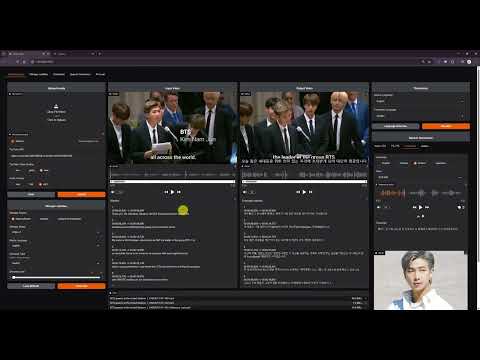





- YouTube video downloads & audio extraction
- Voice separation with Demucs
- Supports 100+ languages for speech recognition & translation
- Speech-to-Text: Whisper, Faster-Whisper, Whisper-Timestamped
- Text-to-Speech:
- Edge-TTS: 100+ languages, 400+ voices
- E2-TTS, F5-TTS, CosyVoice: Zero-shot cloning
- kokoro: Ranked #2 in HuggingFace TTS Arena
- Instant speech recognition
- Multilingual translation on the fly
- Customizable audio inputs
- All-in-one hub: YouTube downloads, noise removal, subtitles, translation, & TTS
- Supports all ffmpeg-compatible formats
- Output options: WAV, FLAC, MP3
- Subtitles & recognition for 100+ languages
- TTS with speed, volume, & pitch controls

- Subtitle-focused: 90+ languages
- Video-integrated subtitle display
- Word-level highlighting & denoise options
- Translation for 100+ languages
- Supports subtitle files (ASS, SSA, SRT, etc.)
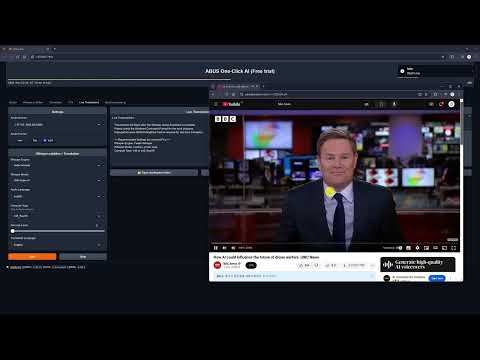
- Real-time voice recognition & translation

- Options: Edge-TTS, F5-TTS, CosyVoice, kokoro
- Celeb voice podcasts & multilingual support

- Please request the voice you want to add on the Issues page. Issues
English
 Andrew Bustamante |
 Andrew Huberman |
 Avi Loeb |
 Ben Shapiro |
 Brett Johnson |
 Brian Keating |
 Coffeezilla |
 Dan Carlin |
 David Buss |
 David Fravor |
 David Kipping |
 Dennis Whyte |
 Donald Hoffman |
 Donald Trump |
 Douglas Murray |
 Duncan Trussell |
 Elon Musk |
 Garry Nolan |
 Jack Barsky |
 James Sexton |
 Jeff Bezos |
 Joe Rogan |
 John Mearsheimer |
 Jordan Peterson |
 Kanye 'Ye' West |
 Mark Zuckerberg |
 Michael Levin |
 Michael Saylor |
 Michio Kaku |
 MrBeast |
 Nick Lane |
 Paul Rosolie |
 Ryan Graves |
 Sam Altman |
 Sam Harris |
 Stephen Wolfram |
 Tucker Carlson |
 Vitalik Buterin |
 Yuval Harari |
Chinese
 迪丽热巴 (Dílì Rèbā) |
 蔡依林 (Cài Yīlín) |
 吴亦凡 (Wú Yìfán) |
 李易峰 (Lǐ Yìfēng) |
 杨幂 (Yáng Mì) |
 赵丽颖 (Zhào Lìyǐng) |
Korean
 BTS 진 (Jin) |
 BTS RM |
 IU (아이유) |
 이병헌 |
 이정재 |
 유재석 |
Japanese
 綾瀬はるか (Ayase Haruka) |
- OS: Windows 10/11 (64-bit), Linux, Mac (Apple Silicon)
- GPU: NVIDIA GPU with a recent driver (>= 570 recommended; RTX 50-series supported). CUDA Toolkit installation is NOT required.
- VRAM: 4GB+ (8GB+ preferred)
- RAM: 4GB+
- Storage: 20GB+ free space
- Internet: Required
Install Voice-Pro with ease using configure.bat and start.bat (use configure.sh and start.sh on Mac/Linux).
- Clone or download the latest release (Source code (zip)) from
git clone https://github.com/abus-aikorea/voice-pro.git- 🚀 configure.bat (optional)
- Sets up git and ffmpeg system-wide (CUDA Toolkit / Visual Studio are no longer needed)
- Requires administrator rights; run once
- No admin rights? Skip it — start.bat downloads a portable ffmpeg automatically
- 🚀 start.bat
- Launches Voice-Pro WebUI
- First run downloads uv + Python 3.12 and installs all dependencies from the lockfile (minutes, not hours), then downloads AI models (~10GB — this is the slow part)
- GPU/CPU is auto-detected; override with the
GPU_CHOICEenvironment variable (G=NVIDIA,C=CPU) or by deletinginstaller_files\gpu_choice.txt - Retry after deleting installer_files if issues arise
- 🚀 update.bat: Re-syncs the Python environment exactly to the committed lockfile (fast)
- Run uninstall.bat or delete the folder (portable install)
- No administrator rights required; add
silentfor unattended removal (uninstall.bat silent) - Only the
installer_filesfolder is removed — yourmodel/andworkspace/folders are kept
By default Voice-Pro uses free services: Deep-Translator (Google's free web endpoint) for translation and Edge-TTS for speech synthesis. If you have your own Microsoft Azure subscription, you can switch both to the Azure APIs:
- Copy
.env.exampleto.envin the project root:copy .env.example .env # Windows cp .env.example .env # Mac/Linux
- Fill in your Azure credentials:
# Azure Speech Service (TTS)
AZURE_SPEECH_KEY=your_azure_speech_key_here
AZURE_SPEECH_REGION=eastus

# Azure Translator Service
AZURE_TRANSLATOR_KEY=your_azure_translator_key_here
AZURE_TRANSLATOR_ENDPOINT=https://your-translator-resource.cognitiveservices.azure.com/
AZURE_TRANSLATOR_REGION=eastus
- Restart Voice-Pro. Valid keys are detected automatically at startup — translation switches to Azure Translator and the first Speech Generation tab becomes Azure-TTS.
When is this worth setting up?
- 🏢 Corporate / restricted networks: security appliances often rate-limit or block the free
translate.google.comendpoint, which slows down or fails long subtitle translations. Voice-Pro retries with backoff and keeps the original text for failed lines (you will see a warning with the failure count), but Azure Translator avoids the problem entirely. - 🗣️ Higher-quality/consistent TTS voices and higher rate limits.
- Do NOT commit
.envto version control — it contains your private keys.
- Close the Windows-Commnad window and run start.bat again.
- Run the browser directly and enter the address displayed in the Windows-Command window (e.g. http://127.0.0.1:7870) in the address bar.
- Check the GPU memory status in Windows Task Manager - Performance tab.
- Set the Denoise level to 0 or 1. Denoise level 2 requires at least 8GB of GPU memory.
- Set Compute Type to int type. The float type has better quality, but requires more GPU memory.
- The quality of subtitles tends to improve with larger Whisper models, but this is not necessarily the case. large > medium > small > base > tiny
- Among compute types, float type has good performance. The int type is a model that reduces GPU usage and increases speed through model quantization. On the other hand, performance decreases.
- If you increase the denoise level, more background sounds will be removed, and only the remaining voice will be used for voice recognition. It does not always guarantee good results.
- Due to WeConnect development work, there will be no Voice-Pro updates for the time being.
- All Voice-Pro code has been made open source. It is now completely free to use.
- WeConnect is a communication platform for global cultural exchange.
The following table lists SaaS platforms supporting subtitling, translation, and text-to-speech (TTS/dubbing) functionalities. Costs are calculated for processing a 60-minute Korean video, including subtitle generation, English translation, and English dubbing, based on the latest available pricing data as of April 15, 2025.
| Platform | Subtitling | Translation | TTS/Dubbing | Cost for 60-min Video (USD, Approx.) | Key Features |
|---|---|---|---|---|---|
| Maestra | ✅ | ✅ | ✅ | $23.70 | 125+ languages, real-time captions, SEO keyword extraction, 15-min free trial. |
| Kapwing | ✅ | ✅ | ✅ | $30~$40 (Pro plan, per minute) | AI subtitles, 100+ language translations, auto lip-sync dubbing, free tier. |
| VEED.IO | ✅ | ✅ | ❌ | $24~$36 (Pro plan, partial) | 99.9% accurate subtitles, Instagram-optimized captions, intuitive editor. |
| HappyScribe | ✅ | ✅ | ✅ | $36~$48 (Pay-as-you-go) | 120+ languages, professional proofreading, secure, meeting transcription. |
| Sonix | ✅ | ✅ | ✅ | $30~$40 (Standard plan) | 54+ languages, 30-min free transcription, YouTube/Zoom integration. |
| Descript | ✅ | ✅ | ✅ | $36~$48 (Creator plan) | Text-based editing, Overdub TTS, filler word removal, 1-hour free transcription. |
| AppTek | ✅ | ✅ | ✅ | Custom pricing (Contact) | Media-focused, custom models, metadata generation, cloud-based Workbench. |
| Transkriptor | ✅ | ✅ | ❌ | $12~$18 (Pay-as-you-go) | 100+ languages, YouTube link transcription, 99% accuracy, simple editor. |
- Maestra: Premium Plan ($158/month, 1200 credits). 60-min video: 60 credits (subtitles) + 60 credits (translation) + 60 credits (dubbing) = 180 credits. Cost = (180/1200) * $158 = $23.70.
- Kapwing: Pro plan (~$24/month, limited minutes). Estimated $0.50~$0.67/min for subtitles+translation+dubbing (based on per-minute pricing trends). 60-min cost: $30~$40. Exact pricing requires confirmation.
- VEED.IO: Pro plan (~$24/month). Subtitles+translation estimated at $0.40~$0.60/min. No TTS, so partial processing. 60-min cost: $24~$36. Confirm at veed.io.
- HappyScribe: Pay-as-you-go (~$0.20/min transcription, $0.20/min translation, $0.20/min dubbing). 60-min cost: $36~$48 (assuming combined services). Confirm at happyscribe.com.
- Sonix: Standard plan (~$10/hour transcription, additional for translation/dubbing). Estimated $0.50~$0.67/min total. 60-min cost: $30~$40. Confirm at sonix.ai.
- Descript: Creator plan (~$24/month, limited hours). Estimated $0.60~$0.80/min for subtitles+translation+dubbing. 60-min cost: $36~$48. Confirm at descript.com.
- AppTek: Custom pricing for enterprise. No public per-minute rates. Contact apptek.ai for quotes.
- Transkriptor: Pay-as-you-go ($0.05~$0.10/min transcription, similar for translation). No TTS, so partial processing. 60-min cost: $12~$18. Confirm at transkriptor.com.
- Cost for 60-min Video: Costs are approximate and assume processing a 60-minute Korean video for subtitles, English translation, and English dubbing (where available). Platforms without TTS (e.g., VEED.IO, Transkriptor) reflect partial processing costs.
- Language Support: Most platforms support Korean and English. Verify specific language availability on their websites.
- Use Cases:
- Media/Entertainment: AppTek, Maestra
- Social Media: Kapwing, VEED.IO
- Podcasts/Interviews: Sonix, Descript
- E-learning/Global Content: Transkriptor, HappyScribe
- Pricing Updates: Pricing may vary due to plan changes or promotions. Check official websites for the latest details.
- For contributions or specific use case recommendations, open an issue or submit a pull request in this repository!
Hello, I'm David from the Voice-Pro team. Our team discovers the best AI technologies in the industry and provides them for anyone to use easily and conveniently. We are a small startup in Korea that has only been around for a year. We are working hard to help you and other creators produce great content.
Your ⭐⭐⭐⭐⭐ review would be greatly appreciated as it helps our business grow with you. Please help support our small team.
Thank you, ABUS Customer Service
- If you want to participate in and help us with this project, feel free to create an Issues
- If something goes wrong, please submit a Pull requests to improve this project.
- Any type of contribution is welcome.
- For inquiries related to purchases, business partnerships, technical tuning, investments, and other matters, please contact us by email. (abus.aikorea@gmail.com)."
- If you like this project, please star this repository. We would greatly appreciate it. ⭐⭐⭐
- You can support Voice-Pro with a donation here:

- Email: abus.aikorea@gmail.com
- Homepage (Korean): https://www.wctokyoseoul.com
- Demucs: https://github.com/facebookresearch/demucs
- yt-dlp: https://github.com/yt-dlp/yt-dlp
- gradio: https://github.com/gradio-app/gradio
- edge-TTS: https://github.com/rany2/edge-tts
- F5-TTS: https://github.com/SWivid/F5-TTS.git
- openai-whisper: https://github.com/openai/whisper
- faster-whisper: https://github.com/SYSTRAN/faster-whisper
- whisper-timestamped: https://github.com/linto-ai/whisper-timestamped
- CosyVoice: https://github.com/FunAudioLLM/CosyVoice
- kokoro: https://github.com/hexgrad/kokoro
- Deep-Translator: https://github.com/nidhaloff/deep-translator
- spaCy: https://github.com/explosion/spaCy
 by ABUS
