This project is a Mini Agentic RAG (Retrieval-Augmented Generation) System designed to answer domain-specific questions with high accuracy and minimal hallucinations. It leverages Azure OpenAI for LLM capabilities and FAISS for efficient vector retrieval. Unlike a standard RAG pipeline, this system features an Agentic Loop implemented with LangGraph that includes:
- Retrieval: Fetching relevant context.
- Self-Reflection (Critic): Evaluating the relevance of retrieved documents.
- Grounded Generation: Answering only when validated context is present.
- Conversational Memory: Remembers previous turns to answer follow-up questions (e.g., "When was it founded?").
- Token Optimization: Strategies to minimize cost while maintaining performance.
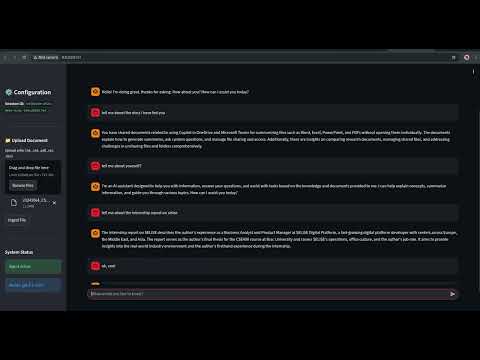
Click the image above to watch the video demo!
The following diagram illustrates the high-level architecture and data flow:
graph TD
    subgraph "Ingestion Pipeline"
        Docs["Documents (PDF/Txt/MD)"] --> Splitter["Text Splitter"]
        Splitter --> Chunks["Chunks"]
        Chunks --> Embed["Azure Embeddings"]
        Embed --> VectorDB[("FAISS Vector Store")]
    end

    subgraph "Agentic Inference Loop"
        User("User Query") --> Agent["Agentic Graph"]
        Agent --> Retrieve("Retrieve Node")
        Retrieve -->|Query| VectorDB
        VectorDB -->|Context| Retrieve
        Retrieve --> Grade("Grade Documents Node")

        Grade -->|Relevance Check| Critic{Relevant?}
        Critic -- No --> GiveUp["Response: 'No relevant info'"]
        Critic -- Yes --> Generate("Generate Node")
        Generate --> Final["Final Answer"]
    end
Before the system can answer questions, it must "learn" the domain knowledge.
- Load: The system scans the
data/directory for supported files:- Text (
.txt) - Markdown (
.md) - PDF (
.pdf) - CSV (
.csv) - Excel (
.xlsx,.xls)
- Text (
- Split: Documents are broken down into manageable chunks (e.g., 1000 characters) to fit within context windows and improve retrieval precision.
- Embed: Each chunk is converted into a vector embedding using Azure's
text-embedding-ada-002. - Store: These vectors are saved locally in a FAISS index (
faiss_index/) for fast similarity search.
When a user asks a question, the request enters a processing graph:
-
Node 1: Retrieve
- The user's query is converted to an embedding.
- The system searches the FAISS index for the top
$k$ most similar document chunks.
-
Node 2: Grade Documents (The "Critic")
- Before blindly using the retrieved info, an LLM (Grader) reviews each chunk.
- It asks: "Is this document chunk actually relevant to the user's question?"
- Irrelevant chunks are discarded to prevent noise and hallucinations.
-
Node 3: Generate
- If relevant documents remain, the LLM generates a concise answer based only on those documents.
- If no documents pass the critique, the system honestly reports it cannot find the answer, rather than hallucinating.
.
├── app.py              # Streamlit Web Dashboard
├── agent.py            # Core LangGraph agent definitions (Nodes & Edges)
├── config.py           # Centralized configuration for Azure & Environment variables
├── data/               # Directory for source documents
├── docker-compose.yml  # Docker services config
├── Dockerfile          # Container definition
├── ingest.py           # Script to process documents and build the index
├── main.py             # CLI entry point for the chat interface
└── requirements.txt    # Python dependencies
- Python 3.10+
- Azure OpenAI API Access
- (Optional) Conda for environment management
- Clone/Setup Project
python3 -m venv .venv
source .venv/bin/activate
pip install -r requirements.txt
- Create Environment
conda env create -f environment.yml
- Activate Environment
conda activate agentic-rag
CRITICAL: Security best practices have been enforced. Hardcoded keys have been removed from config.py.
-
Create
.envfile: Create a file named.envin the root directory. You can use the provided.env.exampleas a template.cp .env.example .env
-
Add your Secrets: Open
.envand fill in your keys:AZURE_OPENAI_API_KEY=your_key_here AZURE_OPENAI_ENDPOINT=https://your-resource.openai.azure.com/ AZURE_DEPLOYMENT_NAME=gpt-4o-mini AZURE_EMBEDDING_DEPLOYMENT=text-embedding-ada-002 AZURE_OPENAI_API_VERSION=2024-08-01-preview # Optional: For Web Search TAVILY_API_KEY=tvly-xxxxxxxxxxxx
Step 1: Add Data
Place your domain knowledge files (.txt, .md, .pdf, .csv, .xlsx) into the data/ folder.
Step 2: Build Index Run the ingestion script to process the data:
python ingest.pyStep 3: Chat Start the interactive question-answering session:
python main.py- Type `exit` or `q` to quit.
- **New**: Type `/add <path/to/file>` to upload a document instantly (e.g., `/add data/new_report.pdf`).
- LangGraph: For orchestrating the stateful agent workflow.
- LangChain: For document loading and chain primitives.
- FAISS: For local, high-performance vector storage.
- Azure OpenAI: For robust Embeddings and Chat completion.
-
DeploymentNotFound (404)
- Cause: The Azure Deployment Name in
config.pydoes not match your Azure resource. - Fix: Update
AZURE_DEPLOYMENT_NAMEinconfig.pywith the exact name from your Azure Portal (e.g.,gpt-4o,gpt-35-turbo).
- Cause: The Azure Deployment Name in
-
BadRequest (400) - json_schema
- Cause: The Agent uses
structured_outputwhich requires a newer Azure API version. - Fix: Ensure
AZURE_OPENAI_API_VERSIONinconfig.pyis set to2024-08-01-previewor later.
- Cause: The Agent uses
-
Index Not Found
- Cause: Running
main.pybeforeingest.py. - Fix: Run
python ingest.pyfirst to generate thefaiss_index.
- Cause: Running
-
TavilySearchAPIWrapper Validation Error
- Cause:
TAVILY_API_KEYis missing or invalid. - Fix: Add your key to
config.pyor export it as an environment variable (export TAVILY_API_KEY=...).
- Cause:
- Change Chunking Strategy: Modify
RecursiveCharacterTextSplitterparameters iningest.py(e.g.,chunk_size,chunk_overlap) to tune how much context is retrieved. - Adjust Prompts: Edit the
systemprompts inagent.pyto change the persona of the grader or the final answer generator. - Add More Tools: Extend the
AgentStateandbuild_graphinagent.pyto include web search (e.g., Tavily) or other tools.
The system now supports stateful conversations.
- Mechanism: Uses
MemorySaverfrom LangGraph to persist state. - Session: Each run of
main.pygenerates a uniqueSession ID. - Capability: You can ask follow-up questions like "Tell me more about that" or "Who founded it?", and the agent will understand the context from previous messages.
To ensure cost-efficiency, the following optimizations are enabled by default in agent.py:
- Reduced Retrieval:
k=2(retrieves top 2 chunks instead of 4). - Context Window Management: Only the last 6 messages (approx. 3 turns) are sent to the LLM during answer generation.
To revert to "High Performance Mode", edit agent.py to set k=4 and remove the history slicing.
To improve result quality and handle missing data:
- Query Rewriting: If initial retrieval fails to find relevant documents, the agent rewrites the user's question to be more search-friendly.
- Web Search Fallback: If the rewritten query still yields no local results, the agent attempts to search the web using Tavily.
- Config: Requires
TAVILY_API_KEYinconfig.py. Skips gracefully if missing.
- Config: Requires
The Streamlit interface now supports Real-time Status Updates ("Retrieving...", "Grading...") and robust answer streaming, ensuring you always know what the agent is currently doing.
The agent now includes a Router Node that intelligently distinguishes between:
- Domain Queries: Uses RAG (e.g., "What is Project Omega?").
- Casual Chat: Handles greetings ("Hi", "Thanks") directly without searching the database, making interactions faster and more natural.
- Content Safety: Automatically handles Azure's "Responsible AI" policy violations by gracefully informing the user instead of crashing.
- Fallback Logic: If the router fails, it safely defaults to general conversation.
To stick to the visual interface instead of the terminal:
streamlit run app.pyOpen http://localhost:8501 in your browser.
- Upload: Use the sidebar to upload files instantly.
- Chat: Interact with the agent naturally.
Deployment is easy with Docker Compose.
- Build & Run:
docker-compose up --build
- Access:
Go to http://localhost:8501.
The system will persist your data in the
data/volume.