A composite GitHub Action that turns conventional commits into a draft release PR, tags the PR on merge, and stages publishing to npm via OIDC trusted publishing.
The aim of uppt is to make a very simple, secure release workflow for maintainers which adheres to best security practices and doesn't require tokens or trusting a third-party GitHub App. It was extracted from scripts used in nuxt/nuxt.
uppt is designed to be used with an opinionated set of security best practices. Here is how to use it.
- Visit
https://npmjs.com/<package-name>/settingsand add a new trusted publisher entry, pointing at your repo and therelease.ymlworkflow, with thenpm stage publishpermission chip. Set the 'Environment name' to 'npm'. In a monorepo, repeat this once per published package, pointing each entry at the same workflow and environment.
Note
Staged publishing requires you to approve the publish before it goes live.
Tip
It is recommended also to set "Require two-factor authentication and disallow tokens."
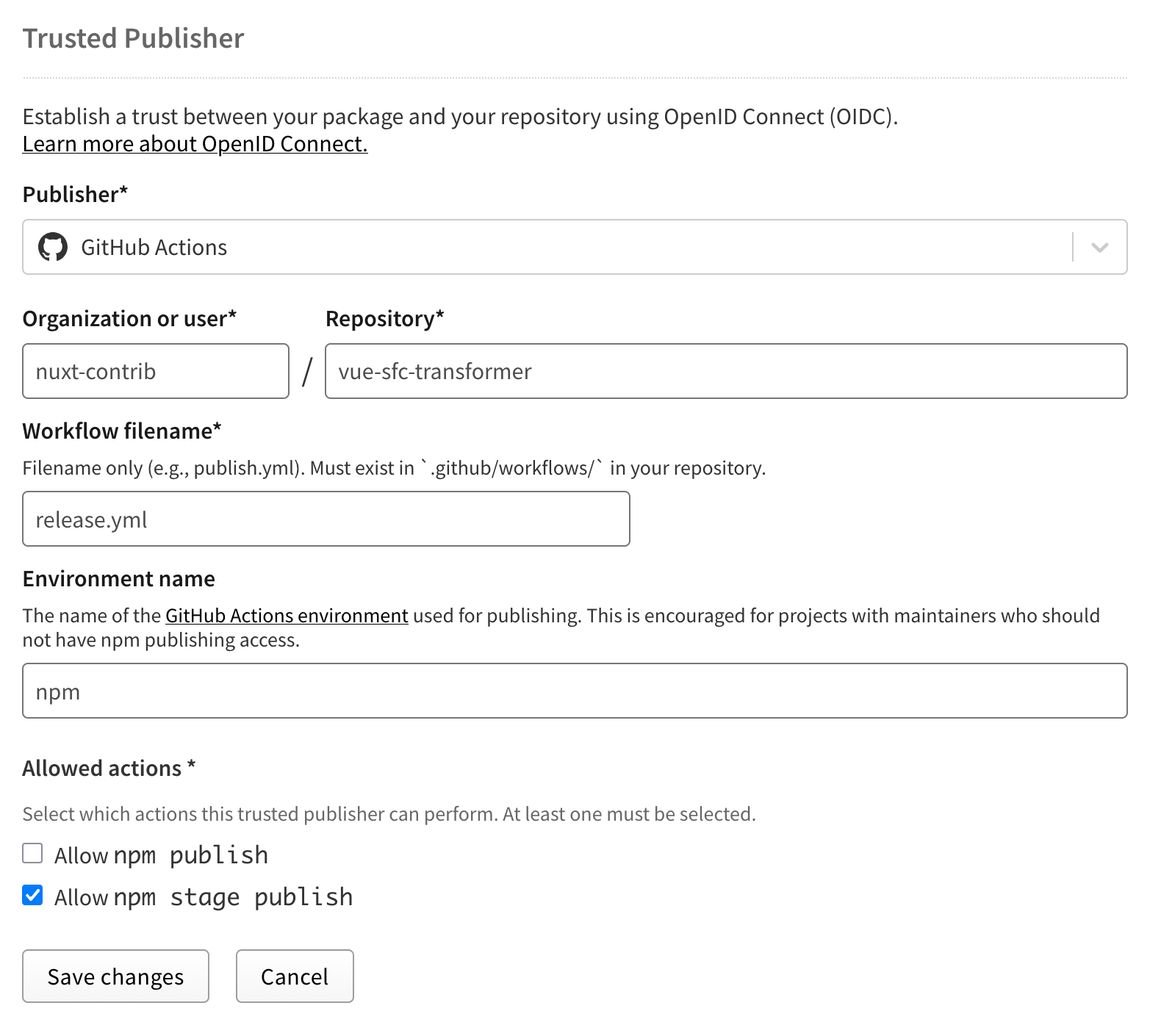
- Create a GitHub environment named
npm. You can scope it tov*tags, and configure any restrictions on it (such as requiring approvals if you want).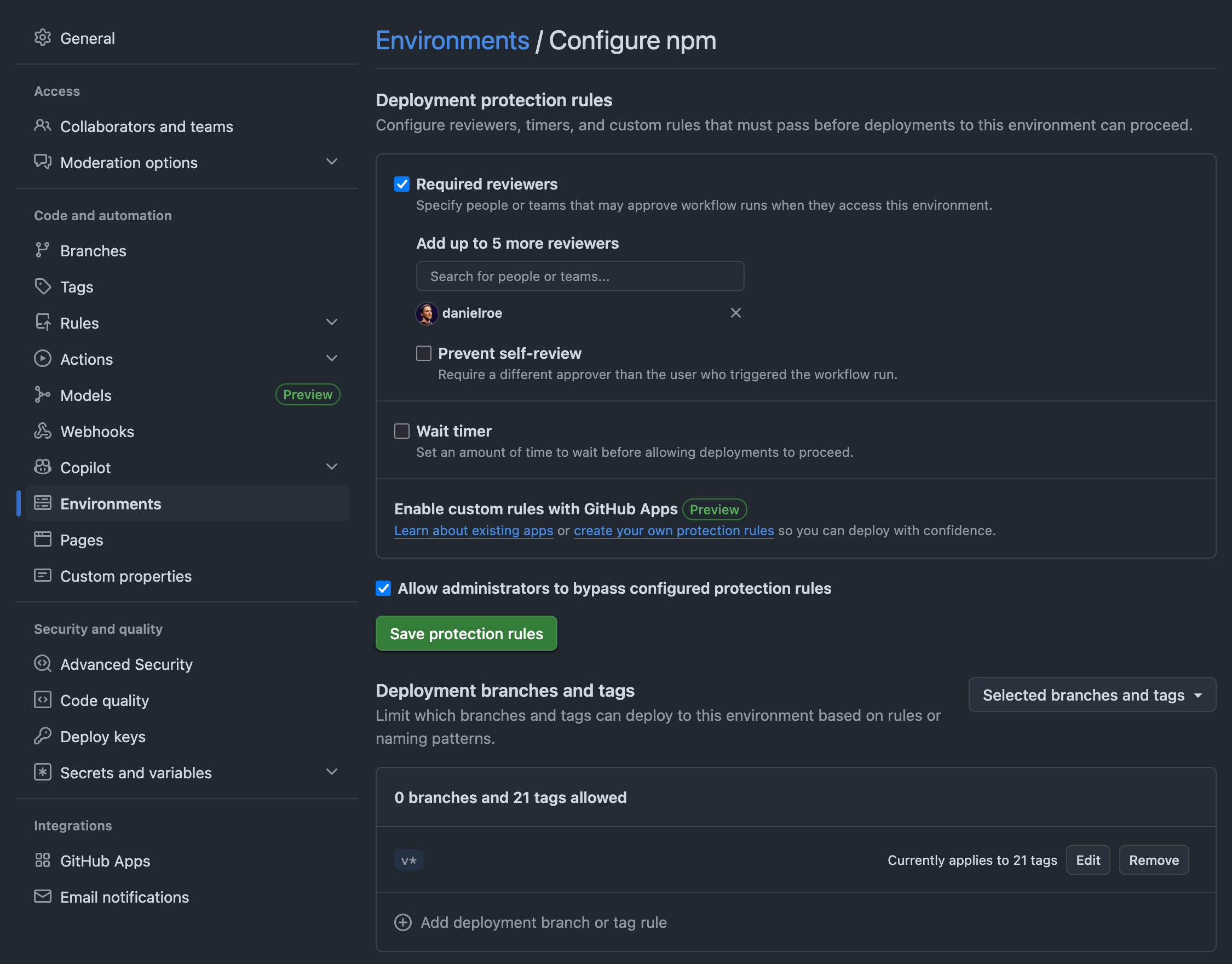
3. Allow GitHub Actions to create pull requests on your repo: under Settings → Actions → General → Workflow permissions (https://github.com/<user>/<repo>/settings/actions), check Allow GitHub Actions to create and approve pull requests. Without this, uppt/pr fails with 403 Forbidden: GitHub Actions is not permitted to create or approve pull requests when opening the release PR.
4. Add the following workflow to your repo in .github/workflows/release.yml, and you're done!
name: release

on:
  push:
    branches: [main]
  pull_request:
    types: [closed]
    branches: [main]
  # this is required to trigger releases when the release PR is merged, or to rerun a release if needed
  workflow_dispatch:

permissions: {}

jobs:
  # Parse commits since the last tag, push a `release/vX.Y.Z` branch, open
  # or update a draft release PR, and close any superseded release PRs
  # (e.g. `release/v1.0.1` when the bump is now `release/v1.1.0`).
  pr:
    if: github.event_name == 'push' && github.ref == format('refs/heads/{0}', github.event.repository.default_branch)
    runs-on: ubuntu-latest
    permissions:
      contents: write       # push the `release/vX.Y.Z` branch and delete superseded ones
      pull-requests: write  # create a release PR, update its body, close superseded PRs
    steps:
      - uses: danielroe/uppt/pr@3a4fd445ce266b91dd73ced7ae8140cc0f9fc19c # v0.5.2
        with:
          token: ${{ secrets.GITHUB_TOKEN }}

  # The release PR was merged: tag the squash commit, cut a GitHub release
  # from the PR body, and dispatch the publish workflow. The `release/v`
  # head-ref guard keeps regular feature-PR merges from triggering this;
  # the head-repo guard keeps merged fork PRs from triggering it.
  release:
    if: |
      github.event_name == 'pull_request'
      && github.event.pull_request.merged == true
      && startsWith(github.event.pull_request.head.ref, 'release/v')
      && github.event.pull_request.head.repo.full_name == github.repository
    runs-on: ubuntu-latest
    concurrency:
      group: release-${{ github.event.pull_request.number }}
      cancel-in-progress: false
    permissions:
      contents: write       # push the `vX.Y.Z` tag and create the GitHub release
      actions: write        # `gh workflow run release.yml --ref vX.Y.Z` chained dispatch
    steps:
      - uses: danielroe/uppt/release@3a4fd445ce266b91dd73ced7ae8140cc0f9fc19c # v0.5.2
        with:
          token: ${{ secrets.GITHUB_TOKEN }}

  # The chained dispatch from `release` lands here as a `workflow_dispatch`
  # event on a `vX.Y.Z` tag ref. The `pack` job installs deps, runs
  # `pnpm pack` (or `npm pack`), and uploads the tarball as a workflow
  # artifact. See "Lifecycle scripts" below for what runs where. Manual
  # recovery uses the same path (Run workflow -> pick a `v*` tag).
  pack:
    if: github.event_name == 'workflow_dispatch' && startsWith(github.ref, 'refs/tags/v')
    runs-on: ubuntu-latest
    concurrency:
      group: pack-${{ github.ref }}
      cancel-in-progress: false
    permissions: {}
    outputs:
      files: ${{ steps.pack.outputs.files }}
    steps:
      - id: pack
        uses: danielroe/uppt/pack@3a4fd445ce266b91dd73ced7ae8140cc0f9fc19c # v0.5.2

  # `publish` downloads the prebuilt tarball from the pack job's
  # artifact and stages it for publish.
  publish:
    if: |
      github.event_name == 'workflow_dispatch'
      && startsWith(github.ref, 'refs/tags/v')
      && needs.pack.outputs.files != '[]'
    needs: pack
    runs-on: ubuntu-latest
    concurrency:
      group: publish-${{ github.ref }}
      cancel-in-progress: false
    permissions:
      id-token: write       # OIDC claim for npm trusted publisher
    environment: npm        # must match the trusted-publisher entry on npmjs.com
    steps:
      - uses: danielroe/uppt/publish@3a4fd445ce266b91dd73ced7ae8140cc0f9fc19c # v0.5.2
        with:
files: ${{ needs.pack.outputs.files }}Whenever you push to the default branch, this action parses conventional commits since the latest semver tag, decides the next bump (major, minor or patch) and creates a release/vX.Y.Z branch with the version bump, and opens or updates a draft PR against the base branch.
Tip
You can edit this PR to add your own release notes. Anything above ## 👉 Changelog is preserved when the changelog is updated.
| Input | Default | Description |
|---|---|---|
token |
${{ github.token }} |
GitHub token. Needs contents: write and pull-requests: write. |
base-branch |
default branch | Base branch for the release PR. |
node-version |
24 |
Node version for the scripts. Needs --experimental-strip-types (Node 22.6+, 24+ recommended). |
checkout |
true |
Set to false if the caller has already checked out with fetch-depth: 0. |
packages |
(unset) | Newline-separated list of publishable workspace directories (paths or globs, e.g. packages/*). When set, uppt operates in monorepo lockstep mode. See Monorepo support. |
When you merge a release PR, this subaction tags that commit, creates a GitHub Release using the PR body as notes, then dispatches the publish workflow on the new tag.
| Input | Default | Description |
|---|---|---|
token |
${{ github.token }} |
GitHub token. Needs contents: write and actions: write. |
node-version |
24 |
Node version for the scripts. Needs --experimental-strip-types (Node 22.6+, 24+ recommended). |
publish-workflow |
release.yml |
Workflow filename to dispatch after tagging. Must declare workflow_dispatch. |
checkout |
true |
Set to false if the caller has already checked out github.event.pull_request.merge_commit_sha. |
This subaction installs the package's dependencies, runs pnpm pack --json (if you have a pnpm-lock.yaml) or npm pack --json, and uploads each resulting .tgz as a workflow artifact for the publish job to consume. It exposes a files output (a JSON array of the produced tarball filenames) so the publish job can iterate them without re-scanning the artifact.
| Input | Default | Description |
|---|---|---|
node-version |
24 |
Node version for the scripts. Needs --experimental-strip-types (Node 22.6+, 24+ recommended). Ignored when install is false. |
checkout |
true |
Set to false if the caller has already checked out the tag ref. |
install |
true |
Set to false to handle actions/setup-node and dependency installation yourself. Useful when you want a pinned package manager version, a cached node_modules, or a hardened install policy. When false, the caller must put node, npm, and any package manager on PATH before uppt/pack runs. |
packages |
(unset) | Newline-separated list of publishable workspace directories (paths or globs). Must match the value passed to uppt/pr. See Monorepo support. |
| Output | Description |
|---|---|
files |
JSON array of tarball filenames produced by npm pack / pnpm pack (e.g. ["my-pkg-1.2.3.tgz"]). Pass through to uppt/publish via its files input. |
This subaction downloads the tarball uploaded by uppt/pack in the same workflow run and runs npm stage publish ./<tarball>.tgz with OIDC authentication. The staged version then needs to be approved by a maintainer with 2FA on npmjs.com before it goes live.
| Input | Default | Description |
|---|---|---|
node-version |
24 |
Node version for the scripts and for npm stage publish. Needs --experimental-strip-types (Node 22.6+, 24+ recommended). |
npm-access |
public |
npm access level (public or restricted). |
files |
(scan artifact) | Optional JSON array of tarball filenames to publish, as emitted by uppt/pack's files output. When omitted, every *.tgz in the downloaded artifact is published. |
uppt runs your package's lifecycle scripts at one specific point and skips them everywhere else. The aim is to keep the runner that produces the tarball from executing more third-party code than it has to.
- During install (inside
uppt/pack): runs with--ignore-scripts. Your dependencies'preinstall/install/postinstallhooks do not fire, and neither does your own repo'sprepare. This is deliberate: it's why a compromised transitive dependency can't run code on the publish runner. If your build genuinely needs a dependency'spostinstallto have run, setinstall: falseonuppt/packand install yourself before the action runs. - During pack (inside
uppt/pack, after install):prepack,prepare, andpostpackrun. This is where your build belongs. - During publish (inside
uppt/publish): nothing runs.prepublishOnlyis not invoked; the prebuilt tarball is published with--ignore-scripts. Move any logic you previously had inprepublishOnlyintoprepackso it runs duringuppt/packand the output lands in the tarball.
uppt supports lockstep monorepos: every publishable package shares a single version, gets bumped together, lands under one vX.Y.Z tag, and is staged in one workflow run.
Declare the publishable workspaces by passing the same packages: input to both uppt/pr and uppt/pack. Each line is a directory path or a glob; !-prefixed entries are excluded; workspaces whose package.json has "private": true are silently skipped (even when listed by an exact path), so playgrounds and example apps stay out of npm.
  pr:
    # ...
    steps:
      - uses: danielroe/uppt/pr@3a4fd445ce266b91dd73ced7ae8140cc0f9fc19c # v0.5.2
        with:
          token: ${{ secrets.GITHUB_TOKEN }}
          packages: |
            packages/*
            !packages/playground

  pack:
    # ...
    steps:
      - uses: danielroe/uppt/pack@3a4fd445ce266b91dd73ced7ae8140cc0f9fc19c # v0.5.2
        with:
          packages: |
            packages/*
            !packages/playground
The lockstep version comes from the workspaces themselves: every listed package must agree on a single semver version, and that's the version uppt bumps from. The root package.json#version (if present) is only bumped when it already matches the lockstep version, so a 0.0.0 or absent root version is left untouched.
Important
The packages: value on uppt/pr and uppt/pack must match. If they diverge, the release PR and the published tarballs will cover different sets of packages.
Important
If you use pnpm, every workspace you list under packages: must also be listed in your pnpm-workspace.yaml. pnpm pack resolves workspace: and catalog: specifiers via the workspace graph, so a directory missing from pnpm-workspace.yaml will produce a tarball with unresolved specifiers (or fail outright).
Note
Independent versioning (per-package tags and cadence) is not yet supported. Track #9 if you need it.
For pr to work you need:
- Allow GitHub Actions to create and approve pull requests enabled under Settings → Actions → General → Workflow permissions (
https://github.com/<user>/<repo>/settings/actions).
For publish to work end to end you need:
- An npmjs.com trusted-publisher entry per package, pointing at the caller's
release.ymland thenpmenvironment, with thenpm stage publishpermission chip. - A GitHub environment named
npm(or whichever name you put on the publish job). - The package must already exist on npmjs.com;
npm stage publishcannot stage a brand-new package.
Inspired by unjs/changelogen and antfu/changelogithub.
There are also a number of other actions and workflows you might want to check out, including:
Made with ❤️
Published under MIT License.