An advanced ROS 2 package for autonomous drone navigation using Soft Actor-Critic (SAC) with Prioritized Experience Replay (PER). It integrates PX4, Gazebo Harmonic, and ROS 2 Humble, enabling obstacle avoidance and learning-based navigation in simulation, with support for real hardware via Micro XRCE-DDS. Monitor and control the drone using QGroundControl.
drl_drone_px4/
├── drl_px4/            # Core RL training and UAV environment code
├── config/             # ROS-Gazebo-PX4 bridge config
├── test/               # PEP8 / PEP257 / linting tests
├── resource/           # Package resources
├── setup.py            # Python package setup
├── package.xml         # ROS 2 package manifest
└── README.md           # Project documentation
- 🧠 SAC + Prioritized Experience Replay for efficient learning
- 🛩️ PX4-Gazebo-ROS 2 integration
- 🪄 Modular training and testing scripts
- 🔄 Micro XRCE-DDS communication with Pixhawk
- 🖥️ QGroundControl support for telemetry visualization
- Operating System: Ubuntu 22.04
- ROS 2: Humble
- PX4 Autopilot: v1.15.4 (recommended for stability)
- Gazebo: Harmonic
- Micro XRCE-DDS Agent: v2.4.2
- QGroundControl: Latest version
- Python: 3.10
- Dependencies:
px4_ros_com,px4_msgs,ros_gzharmonic, etc.
Create a new repository on GitHub (or your preferred platform) named drl_drone_px4. Clone it to your local machine:
mkdir -p ~/ros2_ws/src
cd ~/ros2_ws/src
git clone https://github.com/mohshibinroshankt/drl_drone_px4.git
cd drl_drone_px4Create the necessary directories and files for the ROS 2 package:
mkdir -p drl_px4 config test resource
touch setup.py package.xml README.mdEdit package.xml with the following content:
<?xml version="1.0"?>
<package format="3">
  <name>drl_px4</name>
  <version>0.1.0</version>
  <description>ROS 2 package for autonomous drone navigation using SAC and PER</description>
  <maintainer email="your.email@example.com">Your Name</maintainer>
  <license>Apache-2.0</license>
  <buildtool_depend>ament_python</buildtool_depend>
  <depend>rclpy</depend>
  <depend>std_msgs</depend>
  <depend>px4_msgs</depend>
  <depend>ros_gzharmonic</depend>
  <exec_depend>python3-numpy</exec_depend>
  <exec_depend>python3-torch</exec_depend>
  <test_depend>ament_lint_auto</test_depend>
  <test_depend>ament_lint_common</test_depend>
</package>Edit setup.py with the following content:
from setuptools import setup

package_name = 'drl_px4'

setup(
    name=package_name,
    version='0.1.0',
    packages=[package_name],
    data_files=[
        ('share/ament_index/resource_index/packages', ['resource/' + package_name]),
        ('share/' + package_name, ['package.xml']),
    ],
    install_requires=['setuptools'],
    zip_safe=True,
    maintainer='Your Name',
    maintainer_email='your.email@example.com',
    description='ROS 2 package for autonomous drone navigation using SAC and PER',
    license='Apache-2.0',
    tests_require=['pytest'],
    entry_points={
        'console_scripts': [
            'train_maze = drl_px4.train_maze:main',
            'train_uav = drl_px4.train_uav:main',
            'train_sac = drl_px4.train_sac:main',
            'test_sac = drl_px4.test_sac:main',
            'test_maze = drl_px4.test_maze:main',
        ],
    },
)Ensure Ubuntu 22.04 is installed, then set up ROS 2 Humble, Gazebo Harmonic, PX4, and Micro XRCE-DDS.
Follow the official ROS 2 Humble installation guide for Ubuntu 22.04:
sudo apt update && sudo apt install -y curl gnupg2 lsb-release
sudo curl -sSL https://raw.githubusercontent.com/ros/rosdistro/master/ros.asc | sudo apt-key add -
sudo sh -c 'echo "deb http://packages.ros.org/ros2/ubuntu $(lsb_release -sc) main" > /etc/apt/sources.list.d/ros2-latest.list'
sudo apt update
sudo apt install -y ros-humble-desktop ros-dev-tools
source /opt/ros/humble/setup.bash
echo "source /opt/ros/humble/setup.bash" >> ~/.bashrc
Install Gazebo Harmonic and the ROS-Gazebo bridge for ROS 2 Humble:
sudo apt update
sudo apt install -y ros-humble-ros-gzharmonicClone and set up PX4 Autopilot (v1.15.4 recommended):
cd ~
git clone https://github.com/PX4/PX4-Autopilot.git --recursive
cd PX4-Autopilot
git checkout v1.15.4
git submodule update --init --recursive
bash ./Tools/setup/ubuntu.sh
Install the Micro XRCE-DDS Agent for communication between PX4 and ROS 2:
cd ~
git clone -b v2.4.2 https://github.com/eProsima/Micro-XRCE-DDS-Agent.git
cd Micro-XRCE-DDS-Agent
mkdir build
cd build
cmake ..
make
sudo make install
sudo ldconfig /usr/local/lib/Download and install QGroundControl for telemetry and monitoring:
cd ~
wget https://d176tv9ibo4f19.cloudfront.net/release/QGroundControl.AppImage
chmod +x QGroundControl.AppImageClone necessary PX4 ROS 2 packages into your workspace:
cd ~/ros2_ws/src
git clone https://github.com/PX4/px4_msgs.git --recursive
git clone https://github.com/PX4/px4_ros_com.git --recursiveInstall ROS 2 dependencies for your workspace:
cd ~/ros2_ws
sudo apt update
rosdep install --from-paths src --ignore-src -yBuild and source the ROS 2 workspace:
cd ~/ros2_ws
colcon build --symlink-install
source install/setup.bash
echo "source ~/ros2_ws/install/setup.bash" >> ~/.bashrcMicro XRCE-DDS bridges PX4 and ROS 2, enabling communication between the Pixhawk (or SITL) and a companion computer (e.g., Raspberry Pi).
On the companion computer (or your machine for simulation):
For Simulation (UDP):
MicroXRCEAgent udp4 -p 8888For Hardware (e.g., Pixhawk on /dev/ttyUSB0):
MicroXRCEAgent serial --dev /dev/ttyUSB0 -b 921600The PX4 firmware includes the Micro XRCE-DDS client, which connects to the agent automatically in SITL mode or when configured for hardware.
Start the PX4 SITL simulation with a drone model (e.g., gz_x500):
cd ~/PX4-Autopilot
make px4_sitl gz_x500
This launches Gazebo Harmonic with the PX4 SITL drone model.
In a new terminal, launch the ROS 2 bridge to connect PX4 topics to ROS 2:
source ~/ros2_ws/install/setup.bash
ros2 launch px4_ros_com sensor_combined_listener.launch.py
This bridges PX4 sensor data (e.g., SensorCombined) to ROS 2 topics.
In another terminal, run the SAC training node for the maze environment:
source ~/ros2_ws/install/setup.bash
ros2 run drl_px4 train_maze
You can also run other scripts as needed:
ros2 run drl_px4 train_uav
ros2 run drl_px4 train_sac
ros2 run drl_px4 test_sac
ros2 run drl_px4 test_maze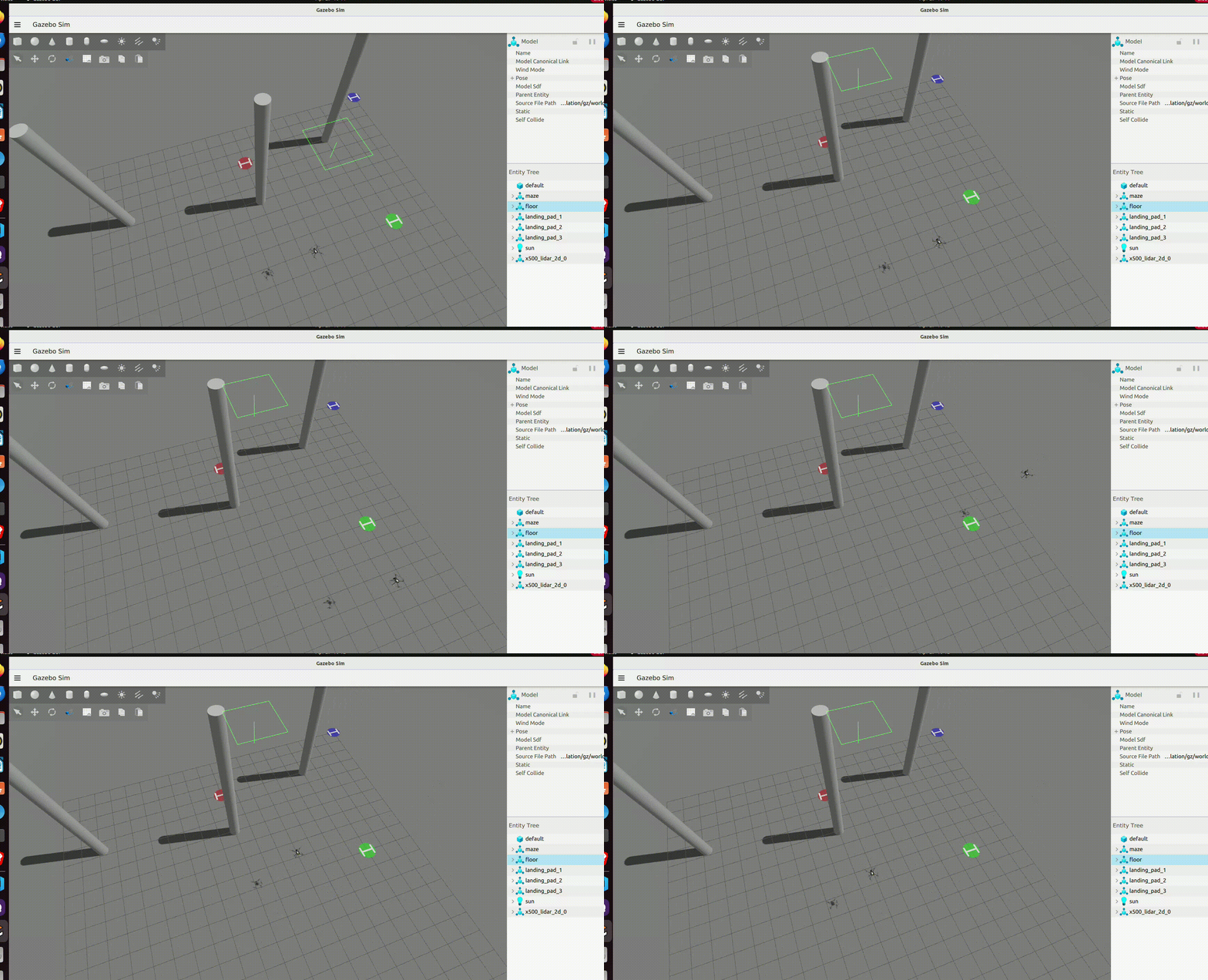

QGroundControl is used to monitor the drone's telemetry, position, and sensor data.
Run QGroundControl on your machine:
cd ~
./QGroundControl.AppImage- For Simulation: QGroundControl should automatically connect to the PX4 SITL instance via UDP (port 14550).
- For Hardware: Connect the Pixhawk to your machine via USB, or configure UDP telemetry in QGroundControl (e.g.,
udp://@localhost:14550).
Use QGroundControl to monitor PX4 parameters, visualize the drone's position, and verify sensor data during training or testing.
-
Set Up Environment:
- Install ROS 2 Humble, Gazebo Harmonic, PX4, Micro XRCE-DDS, and QGroundControl.
- Clone and build the
drl_drone_px4repository in your ROS 2 workspace.
-
Start Communication:
- Launch the Micro XRCE-DDS Agent to bridge PX4 and ROS 2 (UDP for simulation, serial for hardware).
-
Run Simulation:
- Start PX4 SITL with Gazebo (
make px4_sitl gz_x500). - Launch the ROS-Gazebo bridge (
sensor_combined_listener.launch.py).
- Start PX4 SITL with Gazebo (
-
Train or Test:
- Run the SAC training/testing nodes (
ros2 run drl_px4 train_maze).
- Run the SAC training/testing nodes (
-
Monitor with QGroundControl:
- Use QGroundControl to visualize telemetry, position, and sensor data.
-
Evaluate Performance:
- Assess the drone's obstacle avoidance and path learning in simulation or on hardware.
- Ensure your system has sufficient resources (at least 8GB RAM) for Gazebo Harmonic and PX4 SITL.
- For hardware deployment, verify Pixhawk firmware compatibility with PX4 v1.15.4 and Micro XRCE-DDS.
- Expand the training scripts (
train_maze.py, etc.) with your SAC + PER implementation, integrating PX4 sensor data and control commands.