Contacts to organization-chart converter
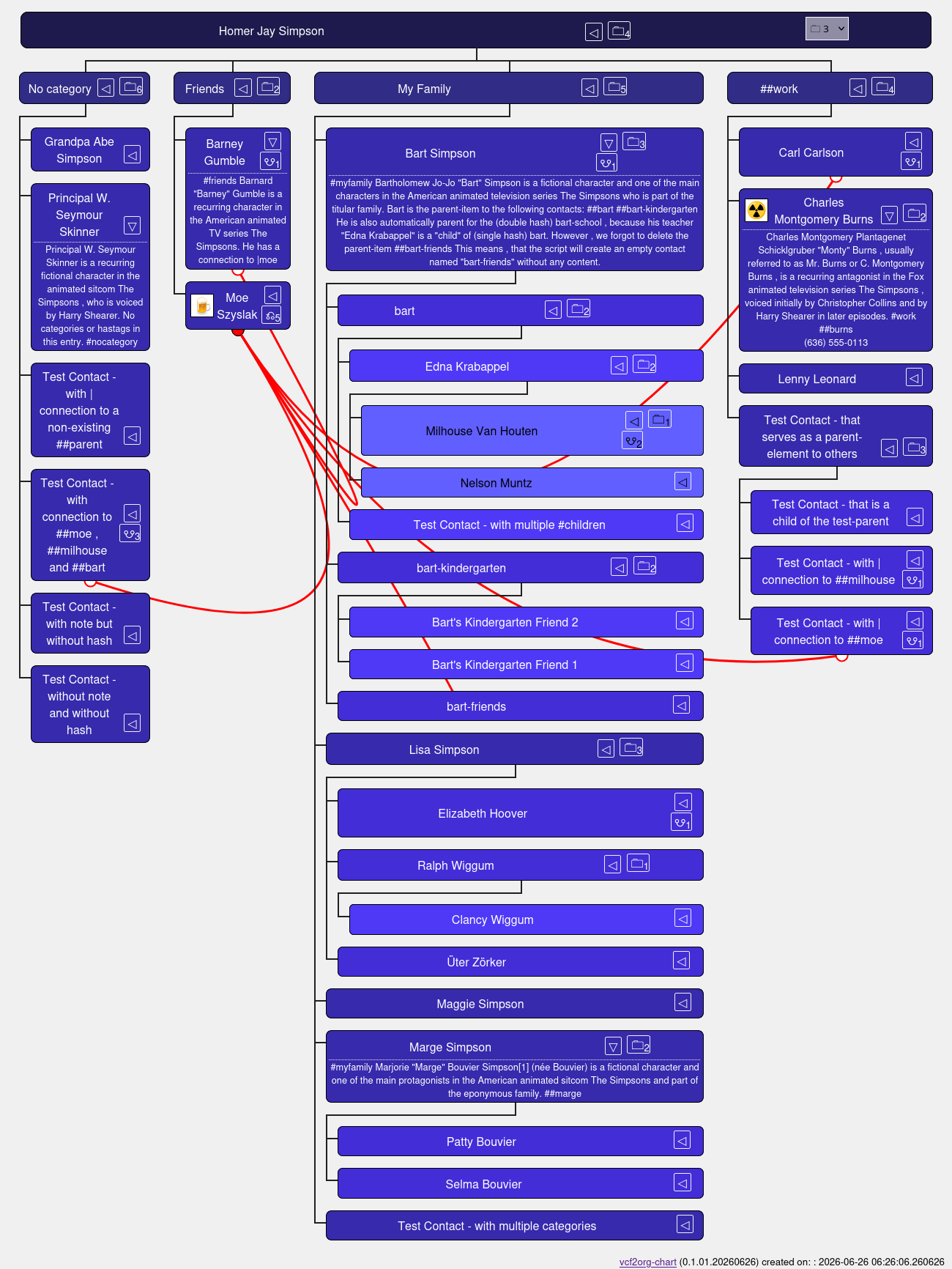
A python script, that converts your address-book into an organigram. The conversion is being processed privacy-friendly offline.
As a result, you can find out, how you know whom. This is based on the idea of "six degrees of separation". https://en.wikipedia.org/wiki/Six_degrees_of_separation
Your buddy Frank (6) is married to Eve (5). She is a colleague of David (4), who plays football with Charlie (3). He is the neighbor of Bob (2), who is the brother to your wife Alice (1).
To run, type vcf2chart.py FILENAME.VCF or vcf2chart.py "../another-folder/FILENAME.VCF" depending on where the file is located.
It creates a file index_contacts.html and should start your browser.
- 🗀 / 🗁 : Show / Hide the (number of) contact-levels under this item.
Example:LisaopensElizabeth Hoover, Ralph Wiggum and Üter Zörker.
RalphopensClancy Wiggum - ▿ / ◃ : Show / Hide the contact-details
- ☋ / ⎌ : Show / Hide the (number of) connections for this contact.
-
Your address-book exported as a vCard VCF-file. Please refer to your email / contact / messenger-application. You can look at the short example of a VCF-file for the TV-show character Homer Simpson.
-
Some hashtags in the NOTE of your contacts
- Three hashes for your own contact details.
Example:###this_is_meor###abcdefor simply### - Two hashes for your "categories". These are the parent-elements.
Example##work, ##friends, ##football - One hash for the child-elements.
Example:
#work, #friends, #football - A child can also be parent to other children.
Example: parent A:##sports-> has child B: with#sports. But B is also labeled parent for##footballto -> child C:#football - A child overrules the category.
Example:My family + #sports-> The contact will be shown under##sportsbut notMy family.
- Three hashes for your own contact details.
-
Optionally: a hashtag
#noin the NOTE for contacts you want to hide from the chart.
Example: TheTest Contact - to ignorein the VCF-file. -
Optionally: Normal categories (sometimes called "label") on your contacts.
Example: The contactsBart, Lisa, Marge, MaggiewithMy familyin the VCF-file. -
Optionally: A connection to a parent-item in your contact. Connections are identified by a pipe symbol "|"
Example:A note with a connection to |moedraws a line to##moe
This can be useful for relations spanning over different categories.
Example:Carlis a child of##workbut he has also a connection to the barkeeper##moe. -
Python in version 3.x or higher
Within the script , find the list_of_vcf_property_types in the first lines. You always need the first four properties!
list_of_vcf_property_types = ["FN", "NOTE", " ", "CATEGORIES"]
But you can add more if you like.
list_of_vcf_property_types = ["FN", "NOTE", " ", "CATEGORIES", "ADR", "TEL", "EMAIL", "BDAY", "URL", "PHOTO"]
A list of properties can be found on Wikipedia https://en.wikipedia.org/wiki/VCard#Properties
The HTML file shows only the first three levels by default. (1: You, 2:Categories / first parents, 3:First children)
Within the assets/treeData.js find the function toggle_levels(3) and change it to another number.
Example: toggle_levels(5)
Within the stylesheets in àssets/css_org_chart.css find the :root-part. It defines the background-colors for up to ten contact-levels.
The text-color (black / white) is calculated automatically based on the background using the CSS contrast-color.
Multiple #children or categories within one contact are not possible.
- Example 1: "Test Contact - with multiple categories" ->
CATEGORIES:Friends,My Family-> last one is taken - Example 2: "Test Contact - with multiple children" ->
NOTE:#burns #bart-> last one is taken
Extra labels aren't filtered.
- Example 1: Homer Simpsons (with extra labels)
TEL;TYPE=WORK:555-7334
TEL;TYPE=HOME:555-6832
results into:
TYPE=WORK:555-7334 TYPE=HOME:555-6832
- Example 2: Montgomery Burns (without extra labels)
TEL:(636) 555-0113
results into:(636) 555-0113
Hashtags should have a space character in front of them. If not, they can cause a mismatch in combination with long texts before the hash tag in the NOTE-part.
Example: In the contact-note you have two lines:
A very long note on a person and a hash tag that follows.
#child
This could look in the VCF file like this:
NOTE:A very long note on a person and a hash tag that follows.
` #child
Which then is processed by the script into:
A very long note on a person and a hash tag that follow.s#child
So it would be better to write a contact-note like this:
A very long note on a person and a hash tag that follows.
 #child
There are different ways to specify a photo. The browser needs a string like
data:image/png;base64,[base64-data] to show the data.
But the vCard contains a string like:
PHOTO:TYPE=PNG;ENCODING=b:[base64-data] or
PHOTO:ENCODING=BASE64;TYPE=PNG:[base64-data] or
PHOTO;MEDIATYPE=image/png:http://example.com/logo.png
So far, not all possible scenarios are covered.
The CSS property contrast-color was introduced in late 2025 / beginning of 2026 into browsers. https://developer.mozilla.org/en-US/docs/Web/CSS/Reference/Values/color_value/contrast-color If you're using an older browser, it might not work, yet.
There is probably space for many improvements. :) Feel free to open an issue, write to me at mathias . steudtner (a) mailbox . org or use it for your own projects.
The scripts (python, HTML, CSS, JavaScript) are licensed under MIT license.
https://choosealicense.com/licenses/mit/
Images and texts can be used under Creative Commons Attribution Share Alike 4.0 International (CC BY SA 4.0)
https://choosealicense.com/licenses/cc-by-sa-4.0/
- initial version.
- reads VCF file
- creates an organizational chart
- shows names, details (notes, telephone, URL, etc.) and photos
- can show / hide sub-levels ("children")
- hides empty categories ("parents") from search
- hides contacts with keyword
#no
- removed some unused data
- children and parents are not case-sensitive anymore
before:#work != #WoRkAfter:#work == #WoRk - added a function to create connections (lines, SVG-paths) between contacts
- show number of connections on the button
- show number of children (levels) on the button
- buttons are better aligned using a table
- added a footer to the HTML-file
- added timestamps to the console log-messages
- corrected some typos